Last post ended with four of six questions answered. The camera position is PlayerCamera.CamTransform.position, the look angles are _rot, you change them by adding to _rot, and the entity list is ItemManager.Items. Two left: which creatures we can actually see, and what angle would point at them.
Both are already written, in the class ApplyAimAssist pointed at.
How to Fish ships a controller aim assist. To work, that assist needs a list of every creature in the world, a visibility test, a way to score targets by how close they are to your crosshair, and a way to rotate the camera toward the winner. Those are the same things an aimbot needs. The difference between the feature the developers shipped and the cheat we want is not the logic. It is the numbers.
The Aim Assist Class
PlayerAimAssist enumerates every entity in the world, filters out anything dead or behind a wall, scores the rest by angle from your crosshair, locks onto the best one with hysteresis so it does not flicker, and rotates your camera toward it.
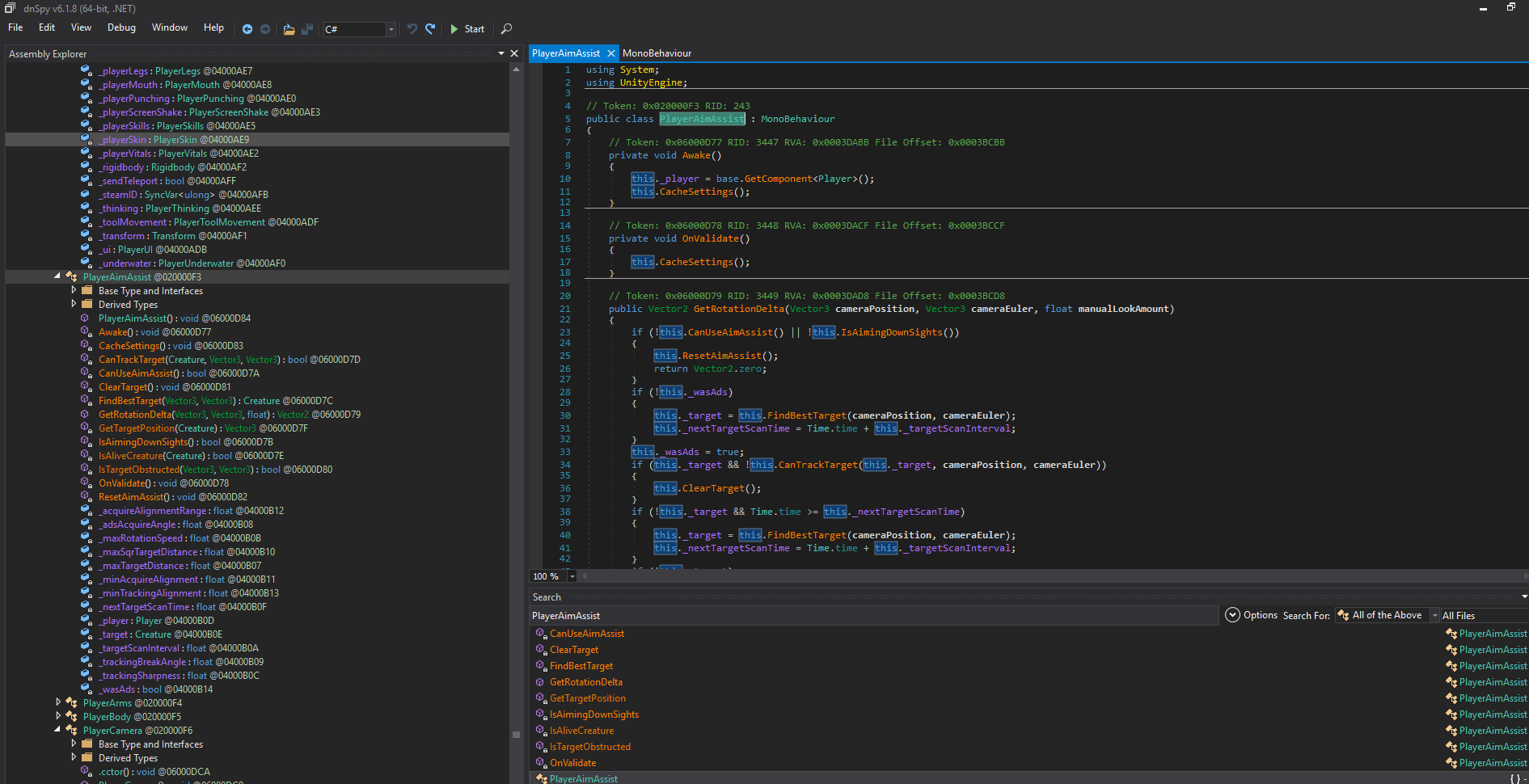
Five stages form a pipeline, with a gate in front of it:
CanUseAimAssistandIsAimingDownSightsdecide whether any of this runs at allIsTargetObstructedandIsAliveCreaturedecide what counts as a valid targetFindBestTargetdecides which valid target is the best oneCanTrackTargetdecides whether we keep the one we haveGetRotationDeltadecides how far to turn this frame
The gate gets its own section, because it is the reason none of this runs on mouse and keyboard. First the pipeline.
Is the target behind a wall?
private static bool IsTargetObstructed(Vector3 cameraPosition, Vector3 targetPosition)
{
	return Physics.Linecast(cameraPosition, targetPosition, GameInfo.LevelLayer | GameInfo.BoatLayer, QueryTriggerInteraction.Ignore);
}
Physics.Linecast fires a ray from the camera to the target and returns true if it hits anything on the given layers, so the return value reads backwards from the method name: true means blocked.
The mask is only level geometry and boats, so creatures do not block line of sight to each other and a fish behind another fish is still valid. QueryTriggerInteraction.Ignore makes trigger colliders transparent, so water volumes and zone triggers do not count as walls.
Is the creature alive?
private static bool IsAliveCreature(Creature creature)
{
    return creature && creature.isActiveAndEnabled && !creature.IsDeinitializing && !creature.IsDead;
}
Same check we copied into Entities.IsAlive last post, including the creature && trick that catches destroyed native objects and the FishNet IsDeinitializing flag for mid-despawn objects.
Which target is the best one?
private Creature FindBestTarget(Vector3 cameraPosition, Vector3 cameraEuler)
{
	Creature result = null;
	float num = float.MaxValue;
	Vector3 lhs = Quaternion.Euler(cameraEuler) * Vector3.forward;
	foreach (Item item in ItemManager.Items.Values)
	{
		Creature creature = item ? item.Creature : null;
		if (PlayerAimAssist.IsAliveCreature(creature))
		{
			Vector3 targetPosition = PlayerAimAssist.GetTargetPosition(creature);
			Vector3 rhs = targetPosition - cameraPosition;
			float sqrMagnitude = rhs.sqrMagnitude;
			if (sqrMagnitude > Mathf.Epsilon && sqrMagnitude <= this._maxSqrTargetDistance)
			{
				float num2 = Vector3.Dot(lhs, rhs) / Mathf.Sqrt(sqrMagnitude);
				if (num2 >= this._minAcquireAlignment && !PlayerAimAssist.IsTargetObstructed(cameraPosition, targetPosition))
				{
					float num3 = (1f - num2) / this._acquireAlignmentRange;
					float num4 = sqrMagnitude / this._maxSqrTargetDistance;
					float num5 = num3 + num4 * 0.1f;
					if (num5 < num)
					{
						num = num5;
						result = creature;
					}
				}
			}
		}
	}
	return result;
}
The foreach is walking ItemManager.Items, the dictionary we built Entities.cs on last post.
After the alive check, each creature goes through three tests.
In range. Compared in squared distance, which is why the field is _maxSqrTargetDistance and why we square our own number before writing to it.
Near the crosshair. This is the one line worth reading:
float num2 = Vector3.Dot(lhs, rhs) / Mathf.Sqrt(sqrMagnitude);num2 is the cosine of the angle between where you are looking and where the target is. 1.0 is dead centre, 0.0 is ninety degrees off, negative is behind you. It gets compared against _minAcquireAlignment, which means that field is a cosine, not an angle. The shipped acquire cone is 18 degrees, so the field holds cos(18°), about 0.95. To make the assist consider the entire world you do not set it to 360, you set it to -1.
Whatever survives gets a score and the lowest wins. It is mostly angle, with distance as a ten percent tiebreaker, so the creature nearest your crosshair wins and distance only settles ties.
Do we keep the target we have?
private bool CanTrackTarget(Creature creature, Vector3 cameraPosition, Vector3 cameraEuler)
{
	if (!PlayerAimAssist.IsAliveCreature(creature))
	{
		return false;
	}
	Vector3 targetPosition = PlayerAimAssist.GetTargetPosition(creature);
	Vector3 rhs = targetPosition - cameraPosition;
	float sqrMagnitude = rhs.sqrMagnitude;
	return sqrMagnitude > Mathf.Epsilon && sqrMagnitude <= this._maxSqrTargetDistance && Vector3.Dot(Quaternion.Euler(cameraEuler) * Vector3.forward, rhs) / Mathf.Sqrt(sqrMagnitude) >= this._minTrackingAlignment && !PlayerAimAssist.IsTargetObstructed(cameraPosition, targetPosition);
}
CanTrackTarget runs the same three tests as above, with one change: it compares against _minTrackingAlignment instead of _minAcquireAlignment. A wider cone to keep a target than to pick one up, which is what stops two fish near the crosshair trading the lock back and forth.
How far do we turn this frame?
public Vector2 GetRotationDelta(Vector3 cameraPosition, Vector3 cameraEuler, float manualLookAmount)
{
	if (!this.CanUseAimAssist() || !this.IsAimingDownSights())
	{
		this.ResetAimAssist();
		return Vector2.zero;
	}
	if (!this._wasAds)
	{
		this._target = this.FindBestTarget(cameraPosition, cameraEuler);
		this._nextTargetScanTime = Time.time + this._targetScanInterval;
	}
	this._wasAds = true;
	if (this._target && !this.CanTrackTarget(this._target, cameraPosition, cameraEuler))
	{
		this.ClearTarget();
	}
	if (!this._target && Time.time >= this._nextTargetScanTime)
	{
		this._target = this.FindBestTarget(cameraPosition, cameraEuler);
		this._nextTargetScanTime = Time.time + this._targetScanInterval;
	}
	if (!this._target)
	{
		return Vector2.zero;
	}
	Vector3 eulerAngles = Quaternion.LookRotation(PlayerAimAssist.GetTargetPosition(this._target) - cameraPosition, Vector3.up).eulerAngles;
	Vector2 a = new Vector2(Mathf.DeltaAngle(cameraEuler.x, eulerAngles.x), Mathf.DeltaAngle(cameraEuler.y, eulerAngles.y));
	float num = 1f - Mathf.Clamp01(manualLookAmount);
	float num2 = 1f - Mathf.Exp(-this._trackingSharpness * Time.deltaTime);
	return Vector2.ClampMagnitude(a * (num2 * num), this._maxRotationSpeed * Time.deltaTime);
}
The only method anything outside the class calls. It returns a pitch and yaw nudge for the camera to add to your look rotation.
It has three parts:
- The gate. Those first two calls decide whether any of this runs. They are the next section.
- Target lifecycle. Pick a target on the frame you enter ADS, drop it if
CanTrackTargetsays it has gone stale, and look for a new one on a timer. That timer is_targetScanInterval, one of the fields we change. - The maths.
ais the full aim error: the rotation that would point at the target, minus where you are currently looking. Returnadirectly and you have a snap aimbot. The last three lines exist to give you less than all of it, and each one is a dial:manualLookAmountbacks the assist off as you steer yourself, so it never fights you for your own camera._trackingSharpnessdecides how fast it converges, smoothed so the strength does not depend on your frame rate._maxRotationSpeedcaps degrees per second, so even a huge error cannot snap.
Turn those three up, widen the two cones, zero the scan timer, force the gate open, and the assist becomes a bot.
The gate
Before touching any of those fields, two things decide whether the code that reads them ever runs.
First, the call site. Back in PlayerCamera.Update:
private void Update()
{
    this.ControllerRotation();
    this.ApplyAimAssist();
    this.ToggleFishCam();
    ...
}
Unconditional. No ADS check at the call site, no multiplier applied to the result, and the delta goes straight into _rot. Every restriction lives inside PlayerAimAssist.
Second, the first line of GetRotationDelta:
if (!this.CanUseAimAssist() || !this.IsAimingDownSights())
{
    this.ResetAimAssist();
    return Vector2.zero;
}
Two checks, and both have to pass before a single field we care about is read.
CanUseAimAssist is the one that matters:
private bool CanUseAimAssist()
{
    return this._player
        && !this._player.BlockInputs
        && this._player.Camera.MouseLocked
        && GameInfo.Input
        && GameInfo.Input.currentControlScheme == "Controller";
}
Four of those five are sanity checks: the player exists, a menu is not blocking input, the mouse is locked so you are actually in control, the input system is up. The last one is the lock. currentControlScheme is the string Unity’s input system uses to say what you are holding, and elsewhere in PlayerCamera it is only ever compared against "Controller" and "Keyboard".
Aim assist is controller only. On mouse and keyboard this returns false, GetRotationDelta returns Vector2.zero on its first line, every frame, forever. Widen the target cones all you like and nothing happens, because nothing reads them. So the order of work is: patch this first, tune the fields second.
The patch goes on this method rather than on GetRotationDelta because this is the smallest thing that is wrong. But a Prefix that just forces the return value to true replaces the whole method, and the other four checks go with it. Two of them we need. BlockInputs is what stops the assist steering the camera while the game’s own pause menu is up, and MouseLocked is what stops it steering while our menu is up: remember that ApplyAimAssist runs unconditionally from PlayerCamera.Update, so the input blocker from last post, which only silences MouseInput and PlayerPunching, does nothing to stop a rotation delta landing in _rot. Throw those checks away and the camera swings toward the nearest seagull while you are trying to drag a slider, which is exactly the bug the last post fixed. So the prefix keeps the first four checks and replaces only the fifth.
IsAimingDownSights is the second check: you are holding a weapon and currently scoped in. We will make forcing that one optional.
One restriction is already off. ApplyAimAssist passes manualLookAmount as _controllerLookInput.magnitude, and _controllerLookInput is only written inside ControllerRotation, which returns immediately unless the scheme is "Controller". On mouse and keyboard that value is permanently zero, so 1f - Mathf.Clamp01(manualLookAmount) is permanently 1 and the assist already runs at full strength.
What this gives us
Every restriction that makes this an assist rather than a bot is a float field or a boolean gate:
| Field or gate | What it restricts | Aimbot value |
|---|---|---|
CanUseAimAssist() |
controller only | scheme check removed, menu checks kept |
IsAimingDownSights() |
only while scoped in with a weapon | always true |
_minAcquireAlignment |
cosine cone to acquire a target | -1f for the whole sphere |
_minTrackingAlignment |
cosine cone to keep one | -1f |
_maxSqrTargetDistance |
maximum range | large, and it is pre-squared |
_trackingSharpness |
how fast it converges | large for an instant snap |
_maxRotationSpeed |
degrees per second ceiling | large |
manualLookAmount |
weakens the assist as you steer | already zero on mouse and keyboard |
Every field there is a private instance member on a MonoBehaviour sitting on PlayerHolder(Clone) next to Player (its Awake does GetComponent<Player>(), so it is the same GameObject), and AccessTools.FieldRefAccess reaches them the same way it reached _rot last post. The two gates are private methods, so they take a Prefix.
Not all six are serialized, and that matters for whether our writes stick. _trackingSharpness, _maxRotationSpeed and _targetScanInterval are inspector values used directly. The other three are derived:
private void CacheSettings()
{
    this._maxSqrTargetDistance = Mathf.Max(this._maxTargetDistance * this._maxTargetDistance, Mathf.Epsilon);
    this._minAcquireAlignment = Mathf.Cos(this._adsAcquireAngle * 0.017453292f);
    this._acquireAlignmentRange = Mathf.Max(1f - this._minAcquireAlignment, Mathf.Epsilon);
    this._minTrackingAlignment = Mathf.Cos(this._trackingBreakAngle * 0.017453292f);
}
The developers edit _maxTargetDistance in metres and the two cones in degrees, and CacheSettings turns them into the squared distance and the cosines the hot path compares against. It is called from Awake and from OnValidate, and OnValidate is editor only. So at runtime the derived fields are written once when the component wakes up and never again, which is why writing to them directly works and why nothing will quietly put the shipped values back under us. Write to the degree fields instead and nothing would happen, because nothing re-runs the conversion. The shipped values, for reference: 60 metres, an 18 degree acquire cone, a 40 degree tracking cone, a rescan every 0.1 seconds, 120 degrees per second, sharpness 10.
Building It
Four files, and only one contains anything you could call cheat logic.
Game/AimAssist.cs
Reach six private fields, and be able to put them back.
using System;
using HarmonyLib;
using UnityEngine;

namespace HtFMod
{
    internal static class AimAssistAccess
    {
        internal static bool Available { get; private set; }

        private static AccessTools.FieldRef<PlayerAimAssist, float> _minAcquire;
        private static AccessTools.FieldRef<PlayerAimAssist, float> _minTracking;
        private static AccessTools.FieldRef<PlayerAimAssist, float> _maxSqrDistance;
        private static AccessTools.FieldRef<PlayerAimAssist, float> _sharpness;
        private static AccessTools.FieldRef<PlayerAimAssist, float> _maxRotSpeed;
        private static AccessTools.FieldRef<PlayerAimAssist, float> _scanInterval;

        // the component we applied to, so a respawn doesn't silently switch the cheat off
        private static PlayerAimAssist _applied;
        private static float _oAcquire, _oTracking, _oSqrDistance, _oSharpness, _oRotSpeed, _oScanInterval;

        // resolved once. A game update that renames a field should log something clear
        // rather than throw a TypeInitializationException out of a field initialiser.
        static AimAssistAccess()
        {
            try
            {
                _minAcquire     = AccessTools.FieldRefAccess<PlayerAimAssist, float>("_minAcquireAlignment");
                _minTracking    = AccessTools.FieldRefAccess<PlayerAimAssist, float>("_minTrackingAlignment");
                _maxSqrDistance = AccessTools.FieldRefAccess<PlayerAimAssist, float>("_maxSqrTargetDistance");
                _sharpness      = AccessTools.FieldRefAccess<PlayerAimAssist, float>("_trackingSharpness");
                _maxRotSpeed    = AccessTools.FieldRefAccess<PlayerAimAssist, float>("_maxRotationSpeed");
                _scanInterval   = AccessTools.FieldRefAccess<PlayerAimAssist, float>("_targetScanInterval");

                Available = true;
            }
            catch (Exception e)
            {
                Available = false;
                Debug.LogWarning($"[HtF] PlayerAimAssist layout changed: {e.Message}");
            }
        }

        internal static PlayerAimAssist Component()
        {
            var player = Player.LocalPlayer;
            return player == null ? null : player.AimAssist;
        }

        internal static void Apply(float rangeMetres, float sharpness, float rotationSpeed)
        {
            if (!Available) return;

            var assist = Component();
            if (assist == null) return;

            // a respawn gives us a brand new component with the original serialized values
            if (!ReferenceEquals(_applied, assist))
            {
                Restore();

                _oAcquire      = _minAcquire(assist);
                _oTracking     = _minTracking(assist);
                _oSqrDistance  = _maxSqrDistance(assist);
                _oSharpness    = _sharpness(assist);
                _oRotSpeed     = _maxRotSpeed(assist);
                _oScanInterval = _scanInterval(assist);

                _applied = assist;
            }

            _minAcquire(assist)     = -1f;   // cosine, not an angle: -1 is the whole sphere
            _minTracking(assist)    = -1f;
            _maxSqrDistance(assist) = rangeMetres * rangeMetres;   // the field is pre-squared
            _sharpness(assist)      = sharpness;
            _maxRotSpeed(assist)    = rotationSpeed;
            _scanInterval(assist)   = 0f;    // retarget the frame the old target dies
        }

        internal static void Restore()
        {
            if (_applied == null) return;

            // the bool operator is false once the native object is destroyed, and then
            // there is nothing left to put back
            if (_applied)
            {
                _minAcquire(_applied)     = _oAcquire;
                _minTracking(_applied)    = _oTracking;
                _maxSqrDistance(_applied) = _oSqrDistance;
                _sharpness(_applied)      = _oSharpness;
                _maxRotSpeed(_applied)    = _oRotSpeed;
                _scanInterval(_applied)   = _oScanInterval;
            }

            _applied = null;
        }
    }
}
The static constructor has a try/catch because a game update that renames _trackingSharpness would otherwise throw a TypeInitializationException from somewhere unhelpful and the mod would look broken for no visible reason. This way it logs which field went missing and carries on with Available false.
The ReferenceEquals check is the subtle part. Die and respawn with the cheat on and the game hands you a fresh PlayerAimAssist carrying the prefab’s values. Without the check we would keep writing to the old destroyed component and the bot would silently stop working. With it, we notice the swap, snapshot the new originals, and apply again. It is ReferenceEquals on purpose: this is the one place we want the “is it the same C# object” answer, not Unity’s “is it still alive” answer, because a destroyed old component and a fresh new one both compare equal to null and we need to tell them apart.
_scanInterval = 0f is the one field not in the table above. With the shipped value, killing a target means waiting out the rescan interval before it picks the next one. At zero it retargets on the following frame.
Saving all six originals matters because these are the game’s own values on a live component, and as CacheSettings showed, nothing recomputes them after Awake. Nothing puts them back for us.
Patches/AimAssistPatches.cs
This is the method we are patching, one more time, because the patch only makes sense next to it:
private bool CanUseAimAssist()
{
    return this._player
        && !this._player.BlockInputs
        && this._player.Camera.MouseLocked
        && GameInfo.Input
        && GameInfo.Input.currentControlScheme == "Controller";
}
Five conditions chained with &&, and the last one is false for anyone on a mouse. There is no field to flip and no argument to change: the string comes from Unity’s input system and we cannot make it say "Controller". The only way past is to stop the method running and hand back the answer ourselves. The answer we hand back is the first four conditions, minus the fifth.
using HarmonyLib;

namespace HtFMod
{
    // On mouse and keyboard this returns false because the control scheme is not
    // "Controller", which short-circuits GetRotationDelta on its first line. Nothing else
    // we do matters until this returns true. The other four checks are kept: BlockInputs
    // and MouseLocked are what stop the bot steering the camera under a menu.
    [HarmonyPatch(typeof(PlayerAimAssist), "CanUseAimAssist")]
    internal static class CanUseAimAssistPatch
    {
        // ____player: three underscores for the field injection, plus the field's own
        // leading underscore, because the field is called _player
        private static bool Prefix(Player ____player, ref bool __result)
        {
            if (!AimbotCheat.Enabled) return true;   // let the original run

            __result = ____player
                && !____player.BlockInputs
                && ____player.Camera.MouseLocked
                && GameInfo.Input;
            return false;                            // skip the original
        }
    }

    // so the bot works from the hip instead of only while aiming down sights
    [HarmonyPatch(typeof(PlayerAimAssist), "IsAimingDownSights")]
    internal static class IsAimingDownSightsPatch
    {
        private static bool Prefix(ref bool __result)
        {
            if (!AimbotCheat.Enabled || !AimbotCheat.FromTheHip) return true;

            __result = true;
            return false;
        }
    }
}
Two pieces of Harmony magic naming here, both introduced in post one and one of them finally used.
__result is wired to the original’s return value, and it is ref because writing to it is how a prefix replaces that value. Set it, return false, and the five-condition chain above never executes: GetRotationDelta asks CanUseAimAssist(), Harmony answers with our four, and the game carries on as if you were holding a controller.
___fieldName with three underscores hands a prefix one of the original object’s private fields. The field we want is _player, which already starts with an underscore, so the parameter is ____player with four. Count them. Harmony strips exactly three and looks up whatever is left, and ___player would fail at patch time looking for a field called player. It is the same trick as AccessTools.FieldRefAccess, just spelled as a parameter, and it is the reason the prefix can keep the BlockInputs and MouseLocked checks without a reflection handle of its own. With those two kept, opening our menu (which calls ToggleMouse(true) and so clears MouseLocked) or the game’s pause menu (which sets BlockInputs) switches the steering off, exactly as it does for a controller player.
The same shape handles IsAimingDownSights. That one sits behind a toggle, because forcing it changes what the cheat feels like rather than whether it runs.
The !AimbotCheat.Enabled guard at the top of each is not optional. PatchAll applies these at startup and they stay applied for the mod’s whole life, so returning true when the cheat is off lets the original run and the game behaves as shipped.
Cheats/Cheat.cs
Two additions to the base class:
// once per frame, whether the menu is open or not
internal virtual void Tick() { }

// called from Plugin.OnDestroy. Anything that changes game state persistently has
// to put it back, or unloading leaves the player stuck with it.
internal virtual void OnUnload() { }
Tick is how the aimbot notices a respawn and re-applies. OnUnload is the same principle as the input blocker last post: unload the mod with this cheat on and the player keeps a world-wide aim assist with nothing left to switch it off.
Cheats/AimbotCheat.cs
using UnityEngine;

namespace HtFMod
{
    internal sealed class AimbotCheat : Cheat
    {
        // read by the patches, which have no instance to ask
        internal static bool Enabled;
        internal static bool FromTheHip = true;

        private float _range = 300f;
        private float _sharpness = 40f;
        private float _rotationSpeed = 720f;

        internal override string Label => "Aimbot";
        internal override KeyCode Hotkey => KeyCode.F10;

        internal override void Activate()
        {
            if (!AimAssistAccess.Available) { ModLog.Error("Aim assist fields not found."); return; }

            if (Enabled)
            {
                Enabled = false;
                AimAssistAccess.Restore();
                ModLog.Info("Aimbot off.");
                return;
            }

            if (AimAssistAccess.Component() == null) { ModLog.Warning("No aim assist yet, are you in a game?"); return; }

            Enabled = true;
            AimAssistAccess.Apply(_range, _sharpness, _rotationSpeed);
            ModLog.Info("Aimbot on.");
        }

        // re-applies after a respawn, and pushes slider changes through live
        internal override void Tick()
        {
            if (!Enabled) return;
            AimAssistAccess.Apply(_range, _sharpness, _rotationSpeed);
        }

        internal override void OnUnload()
        {
            Enabled = false;
            AimAssistAccess.Restore();
        }

        internal override void Draw()
        {
            bool wanted = GUILayout.Toggle(Enabled, Label);
            if (wanted != Enabled) Activate();

            FromTheHip = GUILayout.Toggle(FromTheHip, "Work from the hip");

            Slider("Range", ref _range, 10f, 500f, "0");
            Slider("Snap", ref _sharpness, 1f, 100f, "0");
            Slider("Max deg/s", ref _rotationSpeed, 30f, 1440f, "0");
        }

        private static void Slider(string label, ref float value, float min, float max, string format)
        {
            GUILayout.BeginHorizontal();
            GUILayout.Label(label, GUILayout.Width(70f));
            value = GUILayout.HorizontalSlider(value, min, max);
            GUILayout.Label(value.ToString(format), GUILayout.Width(36f));
            GUILayout.EndHorizontal();
        }
    }
}
Calling Apply from Tick every frame is six field writes and a reference comparison, and it means the sliders take effect live while you watch and a respawn is handled by the check inside Apply.
“Work from the hip” is not a nicety. With it off the second check stays shut unless you are genuinely holding a weapon and scoped in, so pressing the hotkey while empty-handed does nothing at all. Worth knowing before you conclude the patches are broken.
Plugin.cs
Register the cheat and add two loops:
_cheats = new List<Cheat>
{
    new MoneyCheat(),
    new AchievementCheat(),
    new EntityScanCheat(),
    new AimbotCheat(),
};
private void Update()
{
if (Input.GetKeyDown(MenuKey)) ToggleMenu();
foreach (var cheat in _cheats) cheat.Tick(); // runs with the menu open too
// hotkeys only while the menu is shut, so typing in a text field can't fire one
if (ModState.MenuOpen) return;
foreach (var cheat in _cheats)
if (cheat.Hotkey != KeyCode.None && Input.GetKeyDown(cheat.Hotkey))
cheat.Activate();
}private void OnDestroy()
{
foreach (var cheat in _cheats) cheat.OnUnload();
_blocker.Release();
ModState.MenuOpen = false;
_harmony.UnpatchSelf();
ModLog.Raw("HtF Mod unloaded");
}The Tick loop sits above the MenuOpen early return so slider changes are pushed through while the menu is open. The steering itself pauses while the menu is up, because the MouseLocked check the prefix kept fails the moment the input blocker frees the cursor, and picks up again when the menu closes. The OnUnload loop goes first in OnDestroy so the cheats put the game back before the patches come off.
What Happens Now
Press F10 and the game does all of it. PlayerCamera.Update calls ApplyAimAssist, which calls GetRotationDelta, which now passes the gate, walks ItemManager.Items, throws out anything dead or behind a wall, scores every remaining creature by angle, locks onto the best one, works out the shortest rotation to it, smooths that in a frame rate independent way, clamps it to a turn rate, and hands it back for _rot.
We never called FindBestTarget. We never touched _rot. There is not a line of vector maths in the mod. The cheat is two __result assignments and six numbers.
Tuning It
Start with Snap at 10 rather than maxed. That is the shipped _trackingSharpness, so what you get is literally the shipped aim assist with its cones removed: a smooth glide onto whatever you are roughly pointing at.
_acquireAlignmentRange is left alone on purpose. It only divides the angular term of the score, so with a small shipped value the angle dominates the ten percent distance tiebreaker completely, which is the ranking a bot wants anyway.
Two Things We Inherited
Because the game runs the pipeline and we only changed its numbers, two of the developers’ decisions ride along with the cheat. Both are worth reading before trusting it.
Where it aims. GetTargetPosition is private static and we never call it; the game does, so the bot aims at whatever point the developers chose for the assist:
private static Vector3 GetTargetPosition(Creature creature)
{
    if (!creature.Rig)
    {
        return creature.transform.position;
    }
    return creature.Rig.worldCenterOfMass;
}
Centre of mass of the creature’s Rigidbody, with the transform origin as a fallback for anything that has no physics body. That is a good aim point and it is the same one for every creature, so the bot aims where the assist aims and there is nothing to fix. It is also the point the ESP will want to draw at, and it is one line of code we already know works.
What else “aiming down sights” controls. Forcing IsAimingDownSights true is only free if GetRotationDelta is its only caller, and it is: the method is private, and inside the class nothing else touches it. It is also a pure read:
private bool IsAimingDownSights()
{
    Item heldItem = this._player.Holding.HeldItem;
    return heldItem && heldItem.Weapon && heldItem.Weapon.IsAds;
}
Skipping it does not change Weapon.IsAds or anything else on the held item, so the from-the-hip toggle has no side effects beyond the one it advertises. With the toggle off, this is also why the bot does nothing until you are holding a weapon that is scoped in.
What I Have Not Tested
Host versus client. Money needed the host because _money is a SyncVar. Aiming is a different question. _rot is purely local, so the camera will always move, but whether your shots land depends on whatever validates hits. If the server checks fire direction, you will aim perfectly and hit nothing as a client. I have only run this as the host so far; if you take it into someone else’s lobby, that is the first thing to look at.
Where the Code Is
HtFMod/
  Plugin.cs                  + AimbotCheat in the list, Tick loop, OnUnload loop
  Cheats/
    Cheat.cs                 + virtual Tick(), virtual OnUnload()
    AimbotCheat.cs           new
  Game/
    AimAssist.cs             new
  Patches/
    AimAssistPatches.cs      new
Next
The pattern this post leans on is worth stating once: before writing a cheat, look for a feature that already does most of it. Aim assist, auto-aim, snap-to-target, target highlighting and interaction prompts all need the same world queries a cheat needs, and they all ship with the numbers turned down.
In the next post we will create an item spawner so we can actually use our aimbot with a real gun!