In this blog series we will be developing a Unity mod for the game How to Fish.
BepInEx is a mod loader for Unity games. Its whole job is to get your code running inside the game process, with access to the game’s own classes, without touching the game’s files.
How to Fish (HtF) was built in Unity using the Mono scripting backend. That matters. Mono compiles the game’s C# down to standard .NET IL, and IL decompiles back into readable C#, which is the entire reason this approach works at all. Games built with the IL2CPP backend compile to native code instead and need a completely different toolchain (Il2CppDumper plus the IL2CPP build of BepInEx).
In this tutorial we’ll read the game’s source with dnSpy, find the method that hands out money, then write our own .NET assembly that BepInEx loads into the game process so we can call that method directly.
Viewing the Source Code in dnSpy
dnSpy is a .NET debugger and assembly editor. We can use it to read the game’s source unobfuscated. The file we care about:
C:\Program Files (x86)\Steam\steamapps\common\How to Fish\How to Fish\How to Fish_Data\Managed\Assembly-CSharp.dllAssembly-CSharp.dll is where Unity puts all of a game’s own scripts. Everything the developers wrote lives in there.
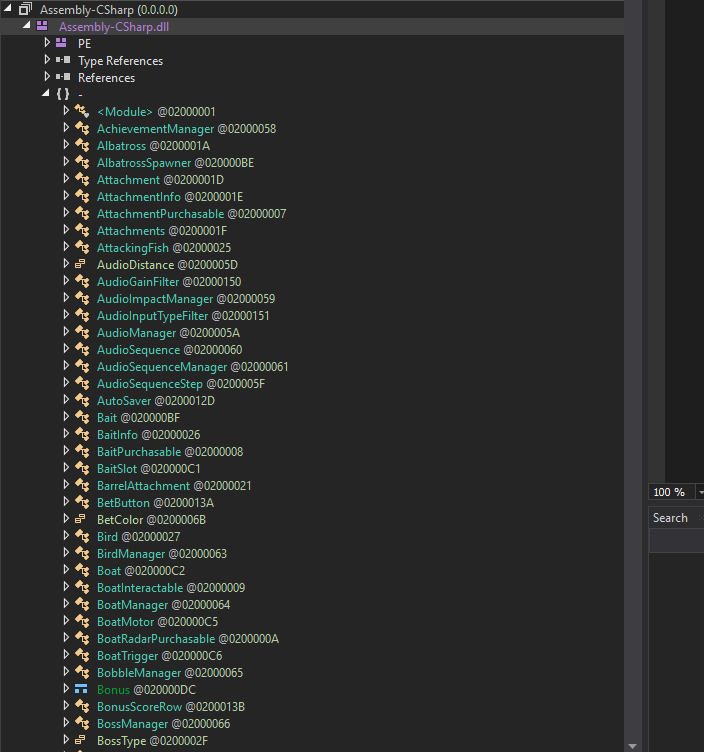
Finding the MoneyManager
I used the search window at the bottom right to figure out how money is handled in this game. Searching for Money surfaced the MoneyManager class right away.
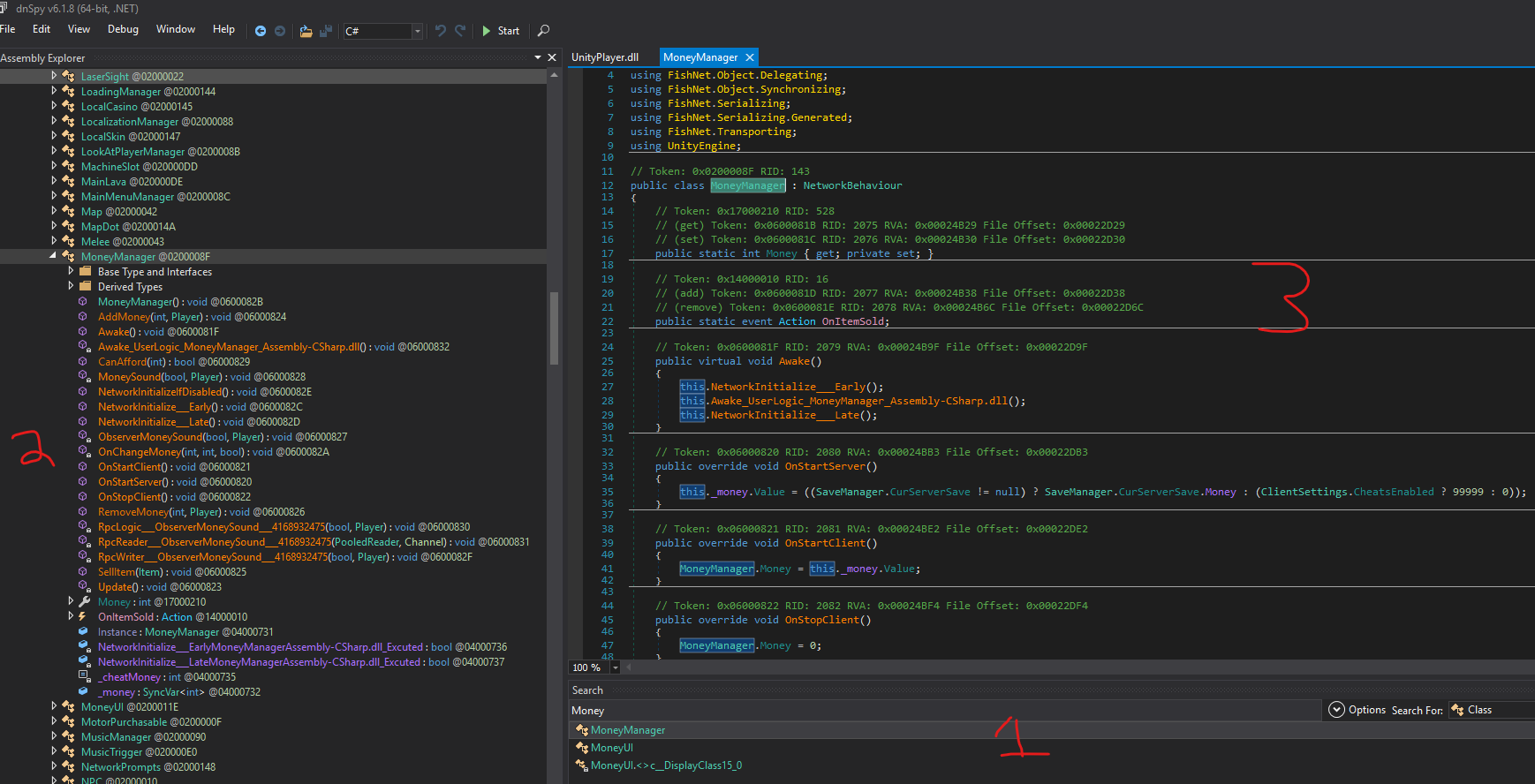
- The search window, where you can search for the
Moneystring - The methods in the
MoneyManagerclass - The
MoneyManagerclass itself
AddMoney
Inside MoneyManager there’s a method called AddMoney(). It’s public static, so we can call it from anywhere without needing an instance. Convenient.
// Token: 0x06000824 RID: 2084 RVA: 0x00024C5C File Offset: 0x00022E5C
public static void AddMoney(int amount, Player player)
{
    if (!MoneyManager.Instance || !MoneyManager.Instance.IsServerInitialized)
    {
        return;
    }
    MoneyManager.Instance._money.Value += Mathf.Abs(amount);
    MoneyManager.Instance.ObserverMoneySound(true, player);
    MoneyManager.Instance.MoneySound(true, player);
}
Two things worth catching before we move on.
That Mathf.Abs(amount) means negative values still add. You can’t drain money through this method no matter what you pass it.
The IsServerInitialized guard is the bigger one. How to Fish uses FishNet for networking, and _money is a SyncVar, meaning a variable the server owns and pushes down to every client. Only the server is allowed to write it. Join someone else’s lobby and AddMoney returns on line one and does nothing at all. Even if you stripped that check out with a patch, your local write would get corrected on the very next sync from the host.
So: host the lobby and this works. Join one and it doesn’t.
Finding our Player Class
AddMoney takes a Player as its second argument, so we need a handle on our own player object.
The obvious approach is to scan the scene for it whenever we need it. That works, sort of. It’s slow, and it’s fragile. Call it at the wrong moment (in the main menu, or halfway through a scene load) and you’ll cache null or grab the wrong object. Then there’s respawn, where the old object gets destroyed and your cached reference quietly goes stale.
Better idea: hook the game’s own initialization. Dumping the Player class turns up an InitializePlayer method, which is the game announcing that a player has finished setting itself up. That’s exactly the moment the reference becomes valid.
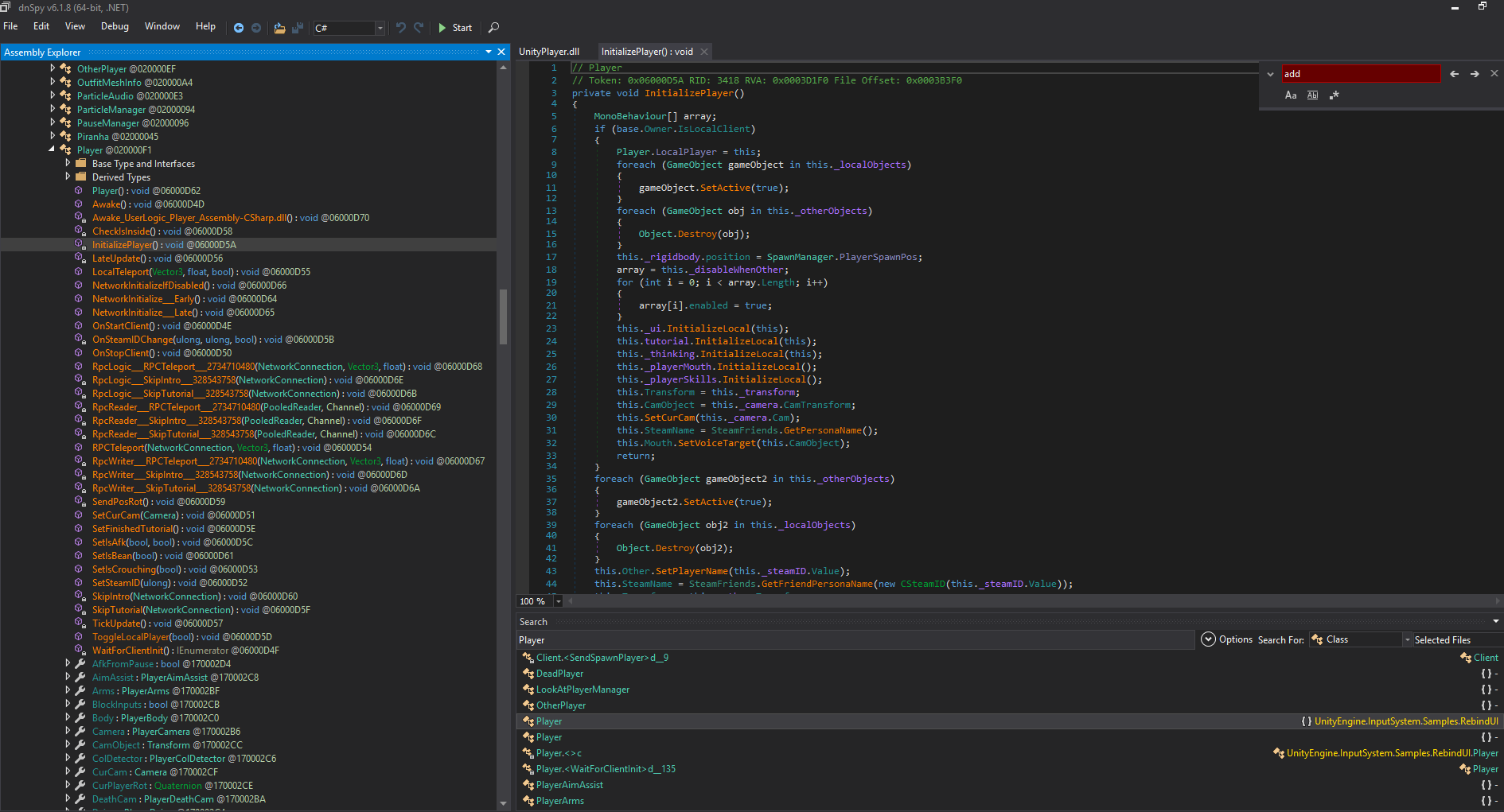
The distinction here is polling versus event-driven. Scanning the scene is “go look, and hope.” Hooking InitializePlayer is “tell me the second it exists.” When the game hands you a hook, take it.
Installing and Configuring BepInEx
Grab BepInEx from the GitHub releases page and copy the contents into your How to Fish directory. You should end up with winhttp.dll sitting next to UnityPlayer.dll, plus a BepInEx folder.
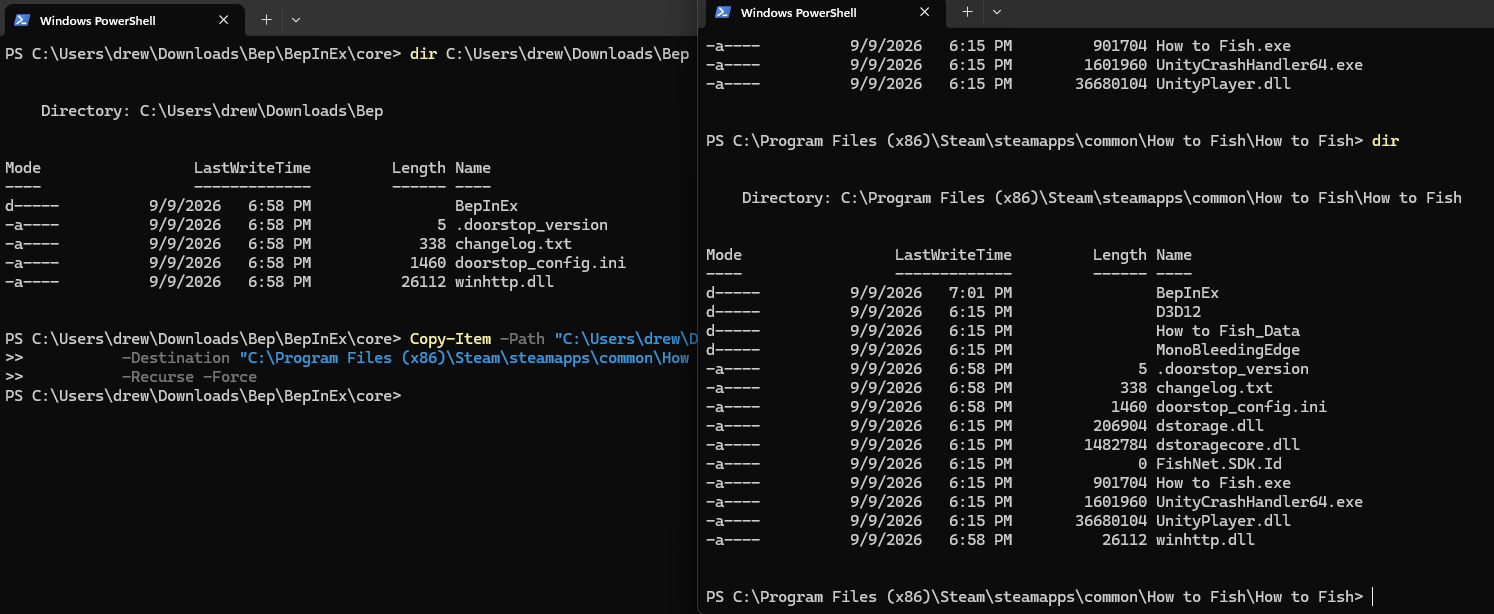
That winhttp.dll is the whole trick. It’s a shim called Doorstop. Windows loads it during process startup, before Unity has initialized anything, and it redirects Mono to run BepInEx’s preloader first. That head start is what lets our code patch methods before the game ever calls them.
Launch the game once through Steam. BepInEx builds out its folder structure and writes a log at How to Fish\BepInEx\LogOutput.txt.
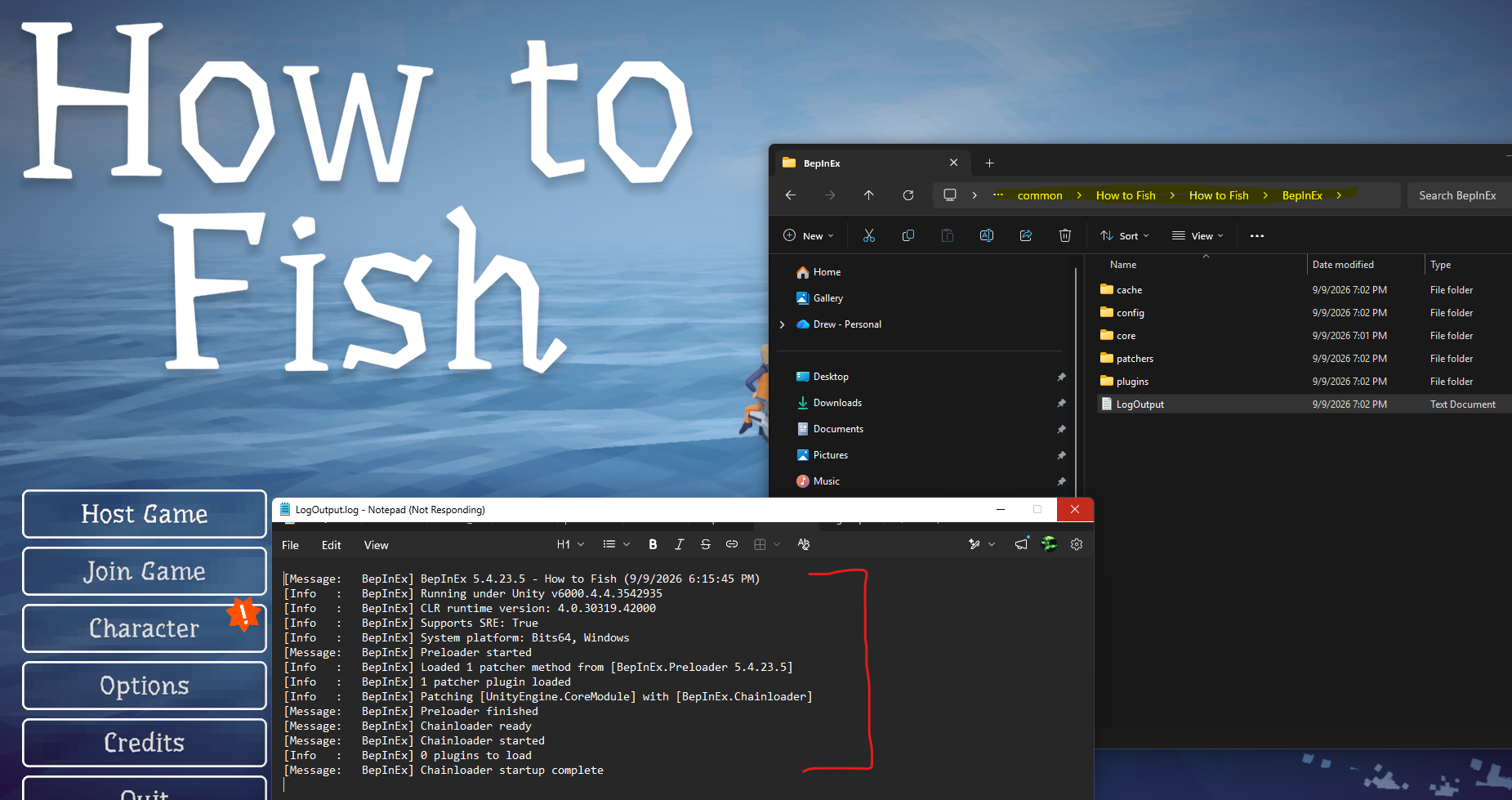
If that file exists and mentions BepInEx starting up, you’re ready to write a plugin.
Creating our Cheat Codebase
Mod loader’s in place. Now we build our own plugin to call AddMoney().
Creating a New DotNet Project
dotnet new classlib -n HtFMod
cd HtFMod
Remove-Item Class1.cs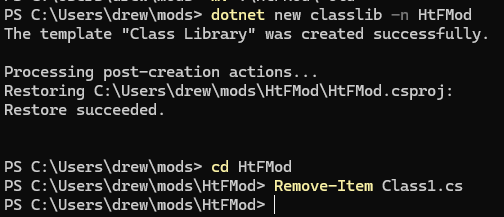
Editing our csproj File
A fresh classlib targets .NET 8 and references nothing, so every single game type you touch fails with CS0246: The type or namespace name could not be found.
Replace the contents of HtFMod.csproj with this:
<Project Sdk="Microsoft.NET.Sdk">

  <PropertyGroup>
    <TargetFramework>net472</TargetFramework>
    <AssemblyName>HtFMod</AssemblyName>
    <LangVersion>latest</LangVersion>
    <DebugType>embedded</DebugType>
    <GameDir>C:\Program Files (x86)\Steam\steamapps\common\How to Fish\How to Fish</GameDir>
    <Managed>$(GameDir)\How to Fish_Data\Managed</Managed>
  </PropertyGroup>

  <ItemGroup>
    <PackageReference Include="Microsoft.NETFramework.ReferenceAssemblies" Version="1.0.3" PrivateAssets="all" />
  </ItemGroup>

  <ItemGroup>
    <Reference Include="BepInEx">
      <HintPath>$(GameDir)\BepInEx\core\BepInEx.dll</HintPath><Private>false</Private>
    </Reference>
    <Reference Include="0Harmony">
      <HintPath>$(GameDir)\BepInEx\core\0Harmony.dll</HintPath><Private>false</Private>
    </Reference>
    <Reference Include="Assembly-CSharp">
      <HintPath>$(Managed)\Assembly-CSharp.dll</HintPath><Private>false</Private>
    </Reference>
    <Reference Include="UnityEngine">
      <HintPath>$(Managed)\UnityEngine.dll</HintPath><Private>false</Private>
    </Reference>
    <Reference Include="UnityEngine.CoreModule">
      <HintPath>$(Managed)\UnityEngine.CoreModule.dll</HintPath><Private>false</Private>
    </Reference>
    <Reference Include="UnityEngine.InputLegacyModule">
      <HintPath>$(Managed)\UnityEngine.InputLegacyModule.dll</HintPath><Private>false</Private>
    </Reference>
        <Reference Include="FishNet.Runtime">
      <HintPath>$(Managed)\FishNet.Runtime.dll</HintPath><Private>false</Private>
    </Reference>
  </ItemGroup>

</Project>
Point GameDir at your own install. Three details in there are worth understanding rather than copying blind:
net472. Unity’s Mono runtime is .NET Framework, not .NET 8. Target the wrong framework and your assembly won’t load, full stop.
Assembly-CSharp.dll. Same file we opened in dnSpy. Referencing it is what makes Player and MoneyManager resolve at compile time.
<Private>false</Private>. Stops these DLLs from being copied next to your plugin, where they’d shadow the game’s own copies at runtime and cause a mess.
Creating our Cheat Code
I made Plugin.cs in the root of the HtFMod folder, right next to the .csproj.
Class Definition and Imports
using BepInEx;
using BepInEx.Logging;
using HarmonyLib;
using UnityEngine;

[BepInPlugin("drew.htf.mod", "HtF Mod", "1.0.0")]
public class Plugin : BaseUnityPlugin
{
    internal static ManualLogSource Log;
    internal static Player LocalPlayer;
    private const int MoneyPerPress = 10000;
}
The [BepInPlugin] attribute is what BepInEx’s chainloader scans for. GUID, display name, version. That name and version are exactly what show up in LogOutput.txt. Leave the attribute off and your DLL just sits in the plugins folder doing nothing forever.
BaseUnityPlugin inherits from MonoBehaviour, which is why Unity calls Awake and Update on our class without us wiring anything up.
Three fields:
Logis BepInEx’s logger, so we can write toLogOutput.txtLocalPlayeris our ownPlayerobject, filled in by the Harmony hookMoneyPerPressis how much cash one keypress is worth
All three are static on purpose. Our Harmony patch lives in a separate class and can’t reach instance members, so Plugin.Log and Plugin.LocalPlayer have to be static for both classes to share them.
Awake Entry Point and Update
Awake() runs the moment BepInEx loads our assembly into the game process. For now, wire up the logger and print proof of life.
private void Awake()
{
    Log = Logger;
    Log.LogInfo("=== HtFMod ready (F5 = +money) ===");
}
Logger is the property BaseUnityPlugin hands us. We copy it into our static Log so the rest of the mod can get at it.
Update() runs once per rendered frame. Keep it cheap, because anything expensive in here costs you FPS directly.
private void Update()
{
    if (Input.GetKeyDown(KeyCode.F5)) GiveMoney(MoneyPerPress);
}
GetKeyDown is true only on the one frame the key goes down. GetKey would be true the entire time it’s held, which at 60 FPS means 60 payouts a second. GiveMoney is our own method, coming up shortly.
Fetching the LocalPlayer
Here’s the hook on InitializePlayer, so the mod learns about our player the instant it’s created.
[HarmonyPatch(typeof(Player), "InitializePlayer")]
internal static class InitializePlayerPatch
{
    private static void Postfix(Player __instance)
    {
        Plugin.Log.LogInfo($"InitializePlayer -> {__instance.name}, IsOwner={__instance.IsOwner}");
        if (__instance.IsOwner) Plugin.LocalPlayer = __instance;
    }
}
Piece by piece.
[HarmonyPatch(typeof(Player), "InitializePlayer")]This says everything in this class patches the InitializePlayer method on the Player class. Harmony finds it when we call PatchAll(), then rewrites that method’s compiled code in memory. The game’s DLL on disk never changes.
internal static class InitializePlayerPatchThe class name is arbitrary, since Harmony locates it by the attribute rather than the name. It does have to be static, because Harmony never creates an instance of it.
private static void Postfix(Player __instance)Postfix is a magic name. Harmony recognises three of them:
Prefixruns before the original. Returnbool, and returningfalsecancels the original entirely.Postfixruns after the original finishes. It can observe and adjust, but it can’t cancel.Transpilerrewrites the method’s IL instruction by instruction. Powerful, rarely what you want.
__instance (two underscores) is magic too. It’s the this of the method we patched, handed to us by Harmony. InitializePlayer is an instance method, so __instance is whichever Player just initialized. There are more of these: __result for the return value, ___fieldName with three underscores to reach private fields.
if (__instance.IsOwner) Plugin.LocalPlayer = __instance;Every player in the lobby passes through this hook, ours and everyone else’s. IsOwner is true only for the one our client controls, so we keep that one and ignore the rest. Nice side effect: it refreshes itself on respawn, when the old object dies and a new one initializes.
Last step, add the Harmony call to Awake so the patch actually gets applied:
private void Awake()
{
    Log = Logger;
    new Harmony("drew.htf.mod").PatchAll();   // NEW
    Log.LogInfo("=== HtFMod ready (F5 = +money) ===");
}
PatchAll() scans the whole assembly for [HarmonyPatch] classes and applies every one it finds. Any patch you add later needs no extra wiring here.
Creating GiveMoney()
Final piece. The method that actually calls MoneyManager.AddMoney().
private static void GiveMoney(int amount)
{
    if (LocalPlayer == null) { Log.LogWarning("No local player."); return; }

    var mm = MoneyManager.Instance;
    if (mm == null) { Log.LogWarning("MoneyManager.Instance is null (not in a game?)"); return; }

    if (!mm.IsServerInitialized)
    {
        Log.LogWarning("Not the server. AddMoney will no-op, host the lobby.");
        return;
    }

    MoneyManager.AddMoney(amount, LocalPlayer);
    Log.LogInfo($"Added {amount}.");
}
Every guard maps to something that genuinely goes wrong in practice: no player yet, not in a game, not the host. That third one is the SyncVar constraint from earlier. AddMoney would silently bail anyway, so checking it ourselves is purely so the log tells us why nothing happened.
The Complete File
using BepInEx;
using BepInEx.Logging;
using HarmonyLib;
using UnityEngine;

[BepInPlugin("drew.htf.mod", "HtF Mod", "1.0.0")]
public class Plugin : BaseUnityPlugin
{
    internal static ManualLogSource Log;
    internal static Player LocalPlayer;

    private const int MoneyPerPress = 10000;

    private void Awake()
    {
        Log = Logger;
        new Harmony("drew.htf.mod").PatchAll();
        Log.LogInfo("=== HtFMod ready (F5 = +money) ===");
    }

    private void Update()
    {
        if (Input.GetKeyDown(KeyCode.F5)) GiveMoney(MoneyPerPress);
    }

    private static void GiveMoney(int amount)
    {
        if (LocalPlayer == null) { Log.LogWarning("No local player."); return; }

        var mm = MoneyManager.Instance;
        if (mm == null) { Log.LogWarning("MoneyManager.Instance is null (not in a game?)"); return; }

        if (!mm.IsServerInitialized)
        {
            Log.LogWarning("Not the server. AddMoney will no-op, host the lobby.");
            return;
        }

        MoneyManager.AddMoney(amount, LocalPlayer);
        Log.LogInfo($"Added {amount}.");
    }
}

[HarmonyPatch(typeof(Player), "InitializePlayer")]
internal static class InitializePlayerPatch
{
    private static void Postfix(Player __instance)
    {
        Plugin.Log.LogInfo($"InitializePlayer -> {__instance.name}, IsOwner={__instance.IsOwner}");
        if (__instance.IsOwner) Plugin.LocalPlayer = __instance;
    }
}
Compiling the Cheat and Loading it Into HtF
PS C:\Users\drew\mods\HtFMod> dotnet build -c Release
Restore complete (0.2s)
    info NETSDK1057: You are using a preview version of .NET. See: https://aka.ms/dotnet-support-policy
  HtFMod net472 succeeded (0.2s) → bin\Release\net472\HtFMod.dll

Build succeeded in 0.8s
PS C:\Users\drew\mods\HtFMod> Copy-Item .\bin\Release\net472\HtFMod.dll `
>>   "C:\Program Files (x86)\Steam\steamapps\common\How to Fish\How to Fish\BepInEx\plugins\" -Force
The DLL goes in BepInEx\plugins\. Make sure that folder actually exists first. BepInEx creates it on first launch, so if it’s missing, you haven’t run the game since installing the loader.
Load the game and our startup message shows up in LogOutput.txt:
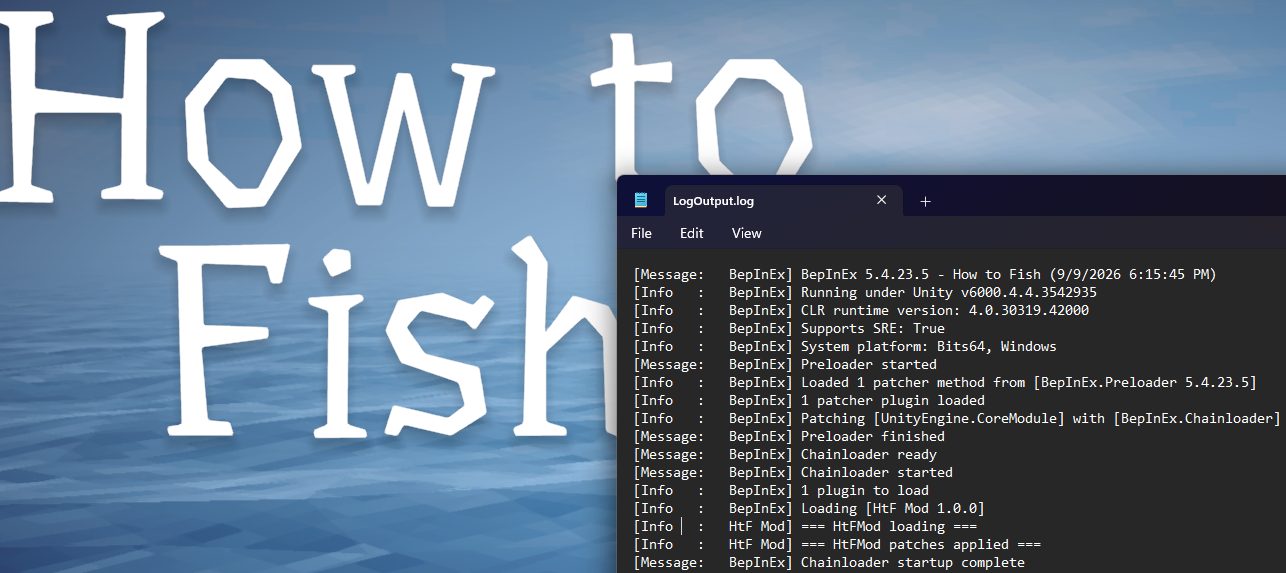
That one line confirms three things at once. The DLL is in the right folder, [BepInPlugin] was found, and Awake ran. Once you also see InitializePlayer -> ... IsOwner=True, the Harmony patch is live and LocalPlayer is populated.
Host a lobby, press F5:

Where to Go Next
The pattern generalises nicely. Find a method in dnSpy, then either call it directly if it’s public, reach it with reflection if it’s private, or patch it with Harmony if you want to change what it does. A few things that fall out of this with almost no extra work:
- A
Prefixreturningfalsedisables a mechanic outright. Hunger drain, fall damage, ammo consumption, whatever. - Reflection on private fields (
AccessTools.Field) lets you retune values like movement speed or jump force at runtime. - An IMGUI menu (
OnGUI) saves you from adding a keybind for every new cheat.
The thing to keep checking is where each piece of code actually runs. In a FishNet game the split between server-authoritative state (money, health, item spawning) and client-side state (movement, camera, UI) is what decides whether your change sticks or gets corrected a frame later. Get that wrong and you’ll spend an hour debugging code that was working the whole time.