Every cheat so far has come from one method. AddMoney, ToggleAllAchievements, GetRotationDelta, SpawnNewItem. Find the method, understand what it touches, and the cheat writes itself.
Weapon.Shoot is the richest one in the game. It fires on every trigger pull and it touches recoil, ammo, cooldown, spread, projectile speed, damage and hit detection, all in about sixty lines. Read it once and you have the shopping list for a whole post’s worth of weapon cheats. This post reads it and builds three: no recoil, no spread, and an adjustable projectile speed.
Finding the Weapon Class
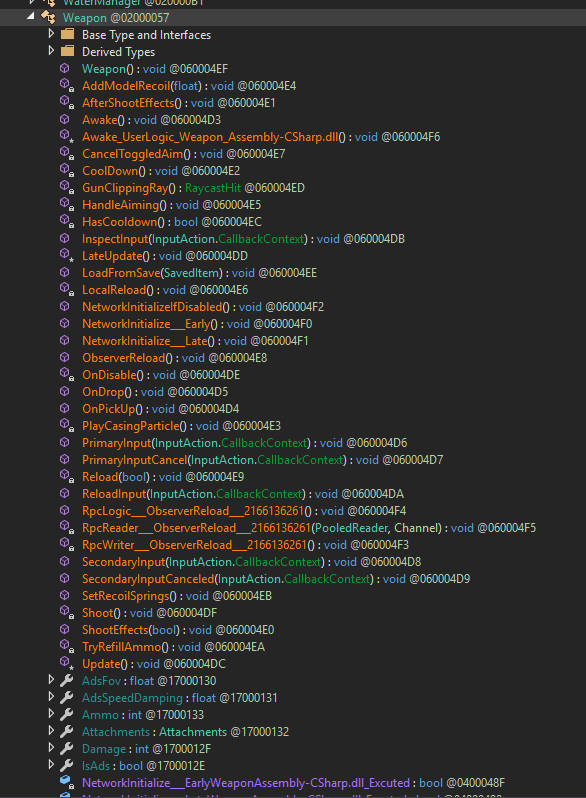
Searching Weapon in dnSpy turns up the class, and Shoot is the method that matters:
private void Shoot()
{
    if (this.HasCooldown() || this._isReloading || this.Ammo == 0)
    {
        return;
    }
    if (this._noShootingDuringShootAnim)
    {
        this.CancelToggledAim();
    }
    this._queuedShoot = false;
    float num = Random.Range(-1f, 1f);
    this.AddModelRecoil(num);
    this._holder.Camera.Recoil(new Vector2(num * this._attachments.ScreenRecoilAmount.x, this._attachments.ScreenRecoilAmount.y));
    this._holder.ToolMovement.Recoil(new Vector2(num * this._attachments.ScreenRecoilAmount.x, this._attachments.ScreenRecoilAmount.y) * this._attachments.WeaponRecoilMulti);
    this._holder.Movement.Knockback(-this._holder.CamObject.forward * (float)this._recoilKnockback);
    PlayerSkills.OnAttack(this._timeBetweenShots);
    int ammo = this.Ammo;
    this.Ammo = ammo - 1;
    // ...cooldown, effects, hit detection...
    Vector3[] array = new Vector3[this._projectileCountPerShot];
    for (int k = 0; k < array.Length; k++)
    {
        Vector3 vector = new Vector3(Random.Range(-1f, 1f), Random.Range(-1f, 1f), Random.Range(-1f, 1f));
        vector = Vector3.ClampMagnitude(vector, 1f);
        array[k] = Quaternion.Euler(vector * this._spread) * forward * this._projSpeed;
    }
    // ...hand the array to ProjectileManager...
}
Before writing anything, it is worth cataloguing what this method exposes, because most of it is a serialized field on Weapon and every one of those is a cheat:
| What | Where | How |
|---|---|---|
| Recoil | three method calls near the top | skip the calls with a patch |
| Spread | _spread in the projectile loop |
field, set to 0 |
| Projectile speed | _projSpeed in the same loop |
field, set to taste |
| Fire rate | _timeBetweenShots |
field |
| Full auto | _fullAuto (read in Update) |
field, force true |
| Multishot | _projectileCountPerShot |
field |
| Damage | _attachments.Damage → LocalHit |
field, but server-validated |
We built the recoil one already; this post finishes it and then takes the two cleanest field edits, spread and projectile speed. The rest are yours to add with the same two patterns.
No Recoil
Four things in Shoot are recoil, and they are the first four calls after the trigger check:
this.AddModelRecoil(num);
this._holder.Camera.Recoil(...);
this._holder.ToolMovement.Recoil(...);
this._holder.Movement.Knockback(...);Camera.Recoilmoves_recoilTar, which feeds the camera rotation. This is the one that actually moves your crosshair. Non-negotiable for a no-recoil cheat.ToolMovement.Recoiladds to_lookRoton the tool rig. That is the held weapon swinging in your view, and it matters more than it looks:Shootfires from_attachments.FirePoint.forward, andFirePointis on the model. If the model is rotated by_lookRot, the next bullet leaves at that angle, so this one affects where shots go, not just what you see.AddModelRecoilshoves the same rig through aConfigurableJoint. Cosmetic mostly, but skipping it makes the gun visibly not kick, which some people find looks broken rather than cheaty, so it gets its own toggle.Knockbackis player movement, not aim, and we leave it alone.
None of these is a field we can zero. They are method calls, so the cheat is a patch that skips them: a prefix returning false cancels the original, and the recoil never lands. That is the return-false prefix from the aimbot’s gate, pointed at three methods instead of one.
The new idea here is that the patch goes on and comes off at runtime, rather than living for the mod’s life behind a flag. Everything patched so far used [HarmonyPatch] + PatchAll, applied once at startup. A toggle wants the opposite: patch on enable, unpatch on disable, so the game runs its own shipped code the rest of the time. That is Harmony.Patch and Harmony.Unpatch called by hand, which is why Plugin now stashes its Harmony instance on ModState for cheats to reach:
// Plugin.Awake
_harmony = new Harmony("drew.htf.mod");
ModState.Harmony = _harmony;
_harmony.PatchAll();
// ModState
internal static Harmony Harmony;The one trap, and it cost me an afternoon: do not call Harmony.Patch from inside Draw. Draw runs inside OnGUI, and patching rewrites a method’s machine code mid-frame, which aborts the IMGUI pass. The visible symptom is a toggle that never flips on, because the click’s state change is discarded when the pass unwinds. The fix is the Tick method from post five: Draw only records what the user wants, and Tick, which runs in Update, does the actual patching one frame later. A field-writing cheat like the aimbot could get away with doing its work in Draw because writing a field mid-frame is harmless. A structural patch cannot.
Cheats/NoRecoilCheat.cs:
using System.Reflection;
using HarmonyLib;
using UnityEngine;

namespace HtFMod
{
    internal sealed class NoRecoilCheat : Cheat
    {
        // the prefix. Returning false skips the original, so the recoil never lands. Shared by
        // every original, and never given a [HarmonyPatch] attribute, or PatchAll would apply
        // it at startup and there would be nothing left to toggle.
        private static bool Skip() => false;

        private static readonly MethodInfo Prefix =
            AccessTools.Method(typeof(NoRecoilCheat), nameof(Skip));

        // the two that move your aim. Both public, so nameof checks the spelling at compile time.
        private static readonly MethodInfo[] AimRecoil =
        {
            AccessTools.Method(typeof(PlayerCamera),       nameof(PlayerCamera.Recoil)),
            AccessTools.Method(typeof(PlayerToolMovement), nameof(PlayerToolMovement.Recoil)),
        };

        // the cosmetic model kick. Private, so a string lookup that can come back null on an update.
        private static readonly MethodInfo[] ModelRecoil =
        {
            AccessTools.Method(typeof(Weapon), "AddModelRecoil"),
        };

        // what the user wants, set from the menu and hotkey. The patching happens in Tick, not here.
        private bool _wantAim;
        private bool _wantModel;

        // what is actually patched right now
        private static bool _aimApplied;
        private static bool _modelApplied;

        internal static bool Enabled => _aimApplied;

        internal override string Label => "No recoil";
        internal override KeyCode Hotkey => KeyCode.F7;

        internal override void Activate() => _wantAim = !_wantAim;

        internal override void Draw()
        {
            _wantAim = GUILayout.Toggle(_wantAim, Label);
            _wantModel = GUILayout.Toggle(_wantModel, "No model kick");
        }

        // reconcile wanted vs applied, once per frame, safely outside OnGUI
        internal override void Tick()
        {
            if (_wantAim != _aimApplied)
            {
                if (_wantAim) Apply(AimRecoil); else Remove(AimRecoil);
                _aimApplied = _wantAim;
                ModLog.Info(_wantAim ? "No recoil on." : "No recoil off.");
            }

            if (_wantModel != _modelApplied)
            {
                if (_wantModel) Apply(ModelRecoil); else Remove(ModelRecoil);
                _modelApplied = _wantModel;
                ModLog.Info(_wantModel ? "Model kick off." : "Model kick on.");
            }
        }

        internal override void OnUnload()
        {
            if (_aimApplied)   { Remove(AimRecoil);   _aimApplied = false; }
            if (_modelApplied) { Remove(ModelRecoil); _modelApplied = false; }
            _wantAim = false;
            _wantModel = false;
        }

        private static void Apply(MethodInfo[] originals)
        {
            foreach (var original in originals)
            {
                if (original == null) { ModLog.Warning("Recoil method not found. Did the game update?"); continue; }

                try
                {
                    ModState.Harmony.Patch(original, prefix: new HarmonyMethod(Prefix));
                }
                catch (System.Exception e)
                {
                    ModLog.Error($"Patch failed on {original.DeclaringType.Name}.{original.Name}: {e.Message}");
                }
            }
        }

        // the game's methods go back to their shipped bytes, not just a flag flip
        private static void Remove(MethodInfo[] originals)
        {
            foreach (var original in originals)
            {
                if (original == null) continue;
                ModState.Harmony.Unpatch(original, Prefix);
            }
        }
    }
}
No Spread and Projectile Speed
Now the two fields, and this is where the earlier catalogue pays off. Both live in the same loop at the bottom of Shoot:
array[k] = Quaternion.Euler(vector * this._spread) * forward * this._projSpeed;_spread scales a random unit vector into a cone, so a projectile leaves at forward rotated by up to _spread degrees in a random direction. Set it to 0f and the rotation is the identity: every projectile leaves exactly along forward. _projSpeed is the muzzle velocity, the length of that direction vector, so it is a plain number to raise or lower.
Both are private serialized fields on Weapon, so this is the FieldRefAccess pattern from the aimbot, not a patch. There is one wrinkle that makes it more than a copy of AimAssistAccess. The aim assist was one component per player that only changed on respawn. The weapon changes every time you swap what you are holding, so the target is moving, and the access class has to notice the swap, restore the weapon you left, and snapshot the one you picked up.
Game/WeaponTweaks.cs:
using System;
using HarmonyLib;
using UnityEngine;

namespace HtFMod
{
    internal static class WeaponAccess
    {
        internal static bool Available { get; private set; }

        private static AccessTools.FieldRef<Weapon, float> _spread;
        private static AccessTools.FieldRef<Weapon, float> _projSpeed;

        private static Weapon _applied;
        private static float _oSpread, _oProjSpeed;

        static WeaponAccess()
        {
            try
            {
                _spread    = AccessTools.FieldRefAccess<Weapon, float>("_spread");
                _projSpeed = AccessTools.FieldRefAccess<Weapon, float>("_projSpeed");
                Available = true;
            }
            catch (Exception e)
            {
                Available = false;
                Debug.LogWarning($"[HtF] Weapon layout changed: {e.Message}");
            }
        }

        // the weapon we are holding, or null for a rod, empty hands, or no player
        internal static Weapon Held()
        {
            var player = Player.LocalPlayer;
            if (player == null || player.Holding == null) return null;
            return player.Holding.HeldItem as Weapon;
        }

        // Each field is overridden only when its flag is set; otherwise it is written back to
        // the snapshotted original, so different guns keep their own shipped values.
        internal static void Apply(bool overrideSpread, float spread, bool overrideProj, float projSpeed)
        {
            if (!Available) return;

            var weapon = Held();
            if (weapon == null) return;

            // held a different weapon than last time: put the old one back, snapshot the new
            if (!ReferenceEquals(_applied, weapon))
            {
                Restore();

                _oSpread    = _spread(weapon);
                _oProjSpeed = _projSpeed(weapon);
                _applied = weapon;
            }

            _spread(weapon)    = overrideSpread ? spread    : _oSpread;
            _projSpeed(weapon) = overrideProj   ? projSpeed : _oProjSpeed;
        }

        internal static void Restore()
        {
            if (_applied == null) return;

            if (_applied)   // false once the native object is destroyed, nothing to put back
            {
                _spread(_applied)    = _oSpread;
                _projSpeed(_applied) = _oProjSpeed;
            }

            _applied = null;
        }
    }
}
Two things worth slowing down on.
Held() returns player.Holding.HeldItem as Weapon, and the as cast is doing real work: HeldItem is an Item, and most of the time it is a fishing rod or nothing, not a weapon. as yields null for those, so Held() returning null is the normal case, not an error, and every caller checks it.
The ReferenceEquals swap is the same trick as AimAssistAccess, but it earns its keep more often here. There it fired only on respawn; here it fires on every weapon change. Miss it and swapping guns would leave the old weapon at spread zero forever and never touch the new one. And note why Apply writes the original value when a flag is off rather than some constant: different guns ship different spread and speed, so “off” has to mean this weapon’s own value, which is exactly what the snapshot holds.
Cheats/WeaponTweaksCheat.cs:
using UnityEngine;

namespace HtFMod
{
    internal sealed class WeaponTweaksCheat : Cheat
    {
        private bool _noSpread;
        private bool _overrideSpeed;
        private float _projSpeed = 300f;

        private bool _applied;

        internal override string Label => "Weapon tweaks";

        // menu only: the cheat is the checkboxes and slider, nothing to fire blind
        internal override void Activate() { }

        internal override void Draw()
        {
            _noSpread = GUILayout.Toggle(_noSpread, "No spread");

            _overrideSpeed = GUILayout.Toggle(_overrideSpeed, "Override projectile speed");
            if (_overrideSpeed)
            {
                GUILayout.BeginHorizontal();
                GUILayout.Label("Speed", GUILayout.Width(50f));
                _projSpeed = GUILayout.HorizontalSlider(_projSpeed, 50f, 1000f);
                GUILayout.Label(_projSpeed.ToString("0"), GUILayout.Width(40f));
                GUILayout.EndHorizontal();
            }
        }

        // re-applies every frame, because the held weapon can change under us: WeaponAccess.Apply
        // notices the swap and moves the override onto the new weapon (and restores the old one)
        internal override void Tick()
        {
            bool wantsAnything = _noSpread || _overrideSpeed;

            if (!wantsAnything)
            {
                if (_applied) { WeaponAccess.Restore(); _applied = false; }
                return;
            }

            if (!WeaponAccess.Available) return;
            if (WeaponAccess.Held() == null) return;   // holding a rod or nothing

            WeaponAccess.Apply(_noSpread, 0f, _overrideSpeed, _projSpeed);
            _applied = true;
        }

        internal override void OnUnload()
        {
            WeaponAccess.Restore();
            _applied = false;
        }
    }
}
Like the aimbot, the work is in Tick, not Draw, but here for a different reason. The aimbot ticked so it could re-apply after a respawn. This ticks so it can re-apply after a weapon swap, and because writing a live field every frame is cheap and harmless, unlike the recoil patch. Draw only reads and writes the checkbox and slider state.
No spread showcase:
Projectile speed showcase:
Two Notes on Where This Runs
Projectile speed has a ceiling that isn’t the slider. Past some speed the projectile moves far enough in one physics step to tunnel straight through a thin collider without ever registering a hit. The slider tops out at 1000 for that reason; if shots start passing through fish, that is why, not a bug in the cheat.
Damage is the line client-side stops working. The catalogue listed _attachments.Damage, and it is tempting: Shoot reads it and hands it to LocalHit right there. But LocalHit is exactly what its name says, the local client’s opinion of the hit, and in a networked game the server has the final say on damage. No recoil, no spread and projectile speed are all local: they change how your client fires and the server accepts the resulting projectiles. Damage is not, and editing it is the point where these client-side field pokes stop being enough. That boundary, local versus server-authoritative, is the same one the money cheat ran into in post one and the aimbot flagged in post five.
Where the Code Is
HtFMod/
  Plugin.cs                  + NoRecoilCheat and WeaponTweaksCheat in the list
  ModState.cs                + Harmony, so runtime patchers share the instance
  Cheats/
    NoRecoilCheat.cs         new
    WeaponTweaksCheat.cs     new
  Game/
    WeaponTweaks.cs          new
Three cheats, one method. That is the whole point of reading Shoot first: recoil, spread and speed were never separate discoveries, they were three lines of the same function, and the catalogue at the top has four more waiting whenever you want them.
Next
Fire rate and full auto are the two easiest remaining entries, both single fields, both the pattern you just wrote. The one that changes shape is damage, and chasing why it does not work as a client is the door into how FishNet validates what a client claims happened, which is a post about the network layer rather than a single method.