Introduction
In this blog post I will be doing a walkthrough of the hard forensics challenge Management wants a Word from TryHackMe. The artifact is a KAPE triage of a Windows C:\ drive, and getting to the flag means working through several layers of encryption on that host — Windows credential stores (SAM / DPAPI), Chrome’s password vault, and finally a VeraCrypt volume — so the sections jump between those subjects on purpose.
Exploring the Contents
The challenge requires you to download a zip file called management-wants-a-word-forensics-hh-day-14-1785854680266.zip. Extracting this reveals a C directory — a captured Windows C:\ drive layout under KAPE, not a full disk image.
I then used ls -lasR to broadly view the contents:
drew@DESKTOP-Q9RF4OJ:/mnt/c/Users/drew/Desktop/management-wants-a-word-forensics-hh-day-14$ ls
KAPE
drew@DESKTOP-Q9RF4OJ:/mnt/c/Users/drew/Desktop/management-wants-a-word-forensics-hh-day-14$ ls -lasR
Finding the System SAM
Under Windows\System32\config sit the registry hives that hold local account material. SAM stores the password hashes for local users; SYSTEM holds the boot key needed to decrypt those hashes; SECURITY has LSA secrets. With an offline copy of those three, you can dump credentials without needing a live login session.
./KAPE/C/Windows/System32/config:
total 104060
    0 drwxrwxrwx 1 drew drew      512 Sep 14 19:29 .
    0 drwxrwxrwx 1 drew drew      512 Sep 14 19:29 ..
  512 -rwxrwxrwx 1 drew drew   524288 Sep 14 19:29 DEFAULT
   64 -rwxrwxrwx 1 drew drew    65536 Sep 14 19:29 DEFAULT.LOG1
  172 -rwxrwxrwx 1 drew drew   176128 Sep 14 19:29 DEFAULT.LOG2
   64 -rwxrwxrwx 1 drew drew    65536 Sep 14 19:29 SAM
   64 -rwxrwxrwx 1 drew drew    65536 Sep 14 19:29 SAM.LOG1
   48 -rwxrwxrwx 1 drew drew    49152 Sep 14 19:29 SAM.LOG2
   32 -rwxrwxrwx 1 drew drew    32768 Sep 14 19:29 SECURITY
  104 -rwxrwxrwx 1 drew drew   106496 Sep 14 19:29 SECURITY.LOG1
    8 -rwxrwxrwx 1 drew drew     8192 Sep 14 19:29 SECURITY.LOG2
68608 -rwxrwxrwx 1 drew drew 70254592 Sep 14 19:29 SOFTWARE
 1664 -rwxrwxrwx 1 drew drew  1703936 Sep 14 19:29 SOFTWARE.LOG1
17560 -rwxrwxrwx 1 drew drew 17981440 Sep 14 19:29 SOFTWARE.LOG2
10240 -rwxrwxrwx 1 drew drew 10485760 Sep 14 19:29 SYSTEM
 2616 -rwxrwxrwx 1 drew drew  2678784 Sep 14 19:29 SYSTEM.LOG1
 2304 -rwxrwxrwx 1 drew drew  2359296 Sep 14 19:29 SYSTEM.LOG2
Dumping the Secrets with Impacket
Impacket’s secretsdump in LOCAL mode reads those hive files from disk and prints NTLM hashes (and related secrets). Passing -sam, -system, and -security points it at the offline copies from the triage:
impacket-secretsdump -sam SAM -system SYSTEM -security SECURITY LOCAL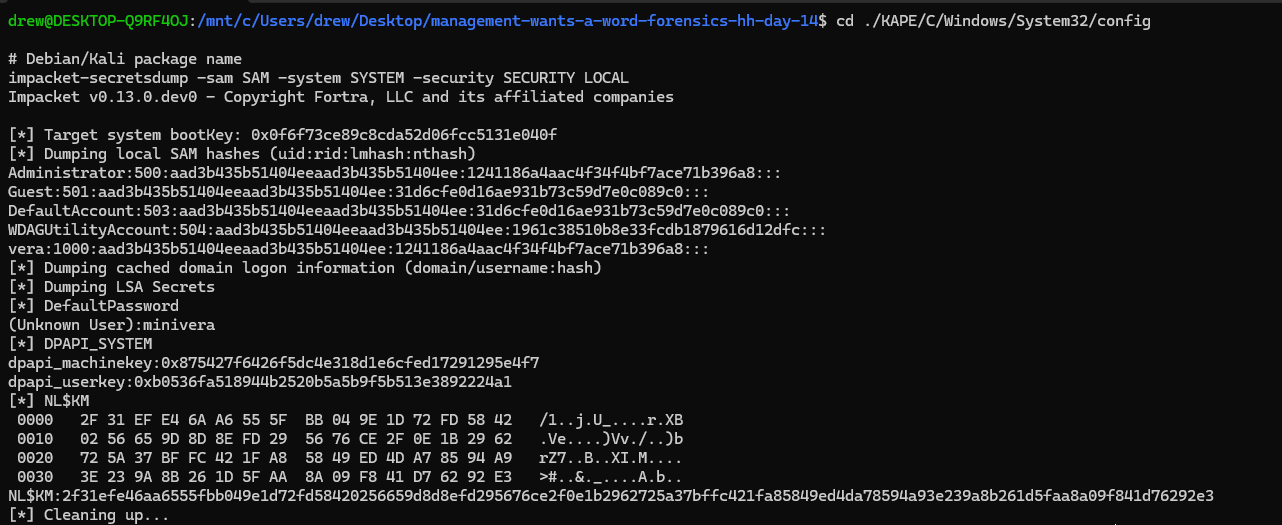
Finding an OS Keyring Secret
Windows protects a lot of user secrets with DPAPI (Data Protection API). Each user has master keys under AppData\Roaming\Microsoft\Protect\<SID>\; apps wrap credentials with those keys, and the keys themselves are locked to the user’s password. The GUID-named file here is one of those master keys for vera.
./KAPE/C/Users/vera/AppData/Roaming/Microsoft/Protect/S-1-5-21-2529683458-431225740-1723070931-1000:
total 4
0 drwxrwxrwx 1 drew drew 512 Sep 14 19:29 .
0 drwxrwxrwx 1 drew drew 512 Sep 14 19:29 ..
0 -rwxrwxrwx 1 drew drew  24 Sep 14 19:29 Preferred
4 -rwxrwxrwx 1 drew drew 468 Sep 14 19:29 c90719ef-5b98-474e-b934-136d606a702a
secretsdump also recovered vera’s cleartext password (minivera). With the SID, master-key file, and that password, Impacket’s dpapi.py masterkey can unwrap the DPAPI master key — which we need later for Chrome:
$ dpapi.py masterkey   -file c90719ef-5b98-474e-b934-136d606a702a   -sid S-1-5-21-2529683458-431225740-1723070931-1000   -password minivera
Impacket v0.13.1 - Copyright Fortra, LLC and its affiliated companies

[MASTERKEYFILE]
Version     :        2 (2)
Guid        : c90719ef-5b98-474e-b934-136d606a702a
Flags       :        5 (5)
Policy      :        0 (0)
MasterKeyLen: 000000b0 (176)
BackupKeyLen: 00000090 (144)
CredHistLen : 00000014 (20)
DomainKeyLen: 00000000 (0)

Decrypted key with User Key (SHA1)
Decrypted key: 0x5e5715ec9b6df5a86e97902692a66d28e691f05d5bc1e04d0159cfe960e94c978c07e5004a0179d3a96df2468885a28175b0b02cc064445f116a752d2b3e9d40
Finding a Chrome Profile
A chrome profile can be found under veras app data folder.

Inside the default profile we can find login data:
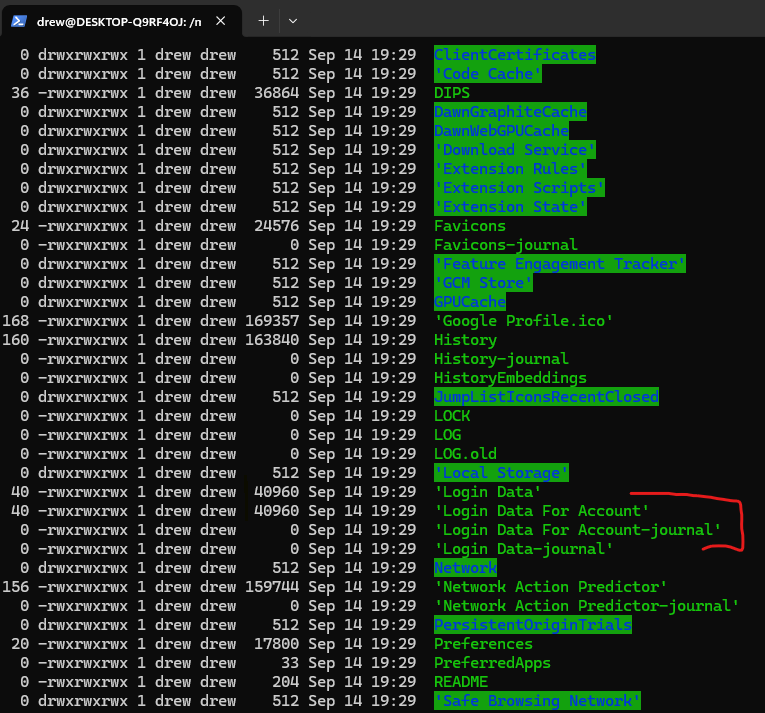
Chrome’s login data is protected by the OS Keyring, luckily we already have the decryption password.
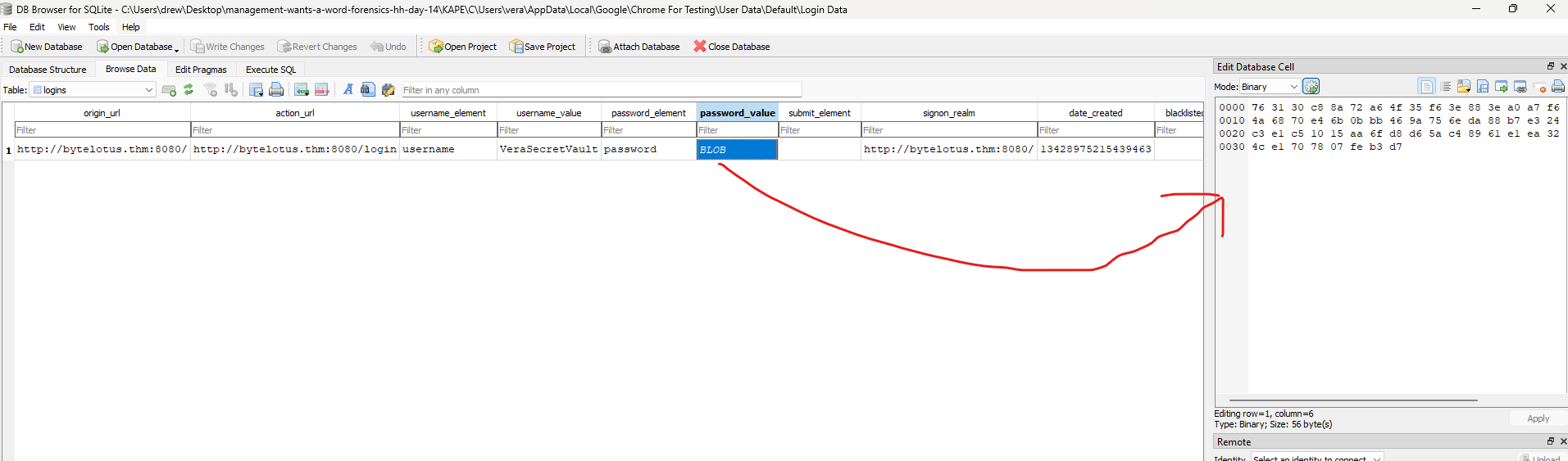
If we open the database file in a SQLite database viewer, we can export the encrypted blob containing the password:
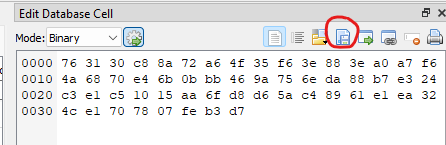
Decrypting the Local State Key
From the Chrome For Testing User Data directory, this script pulls the encrypted AES key out of Local State (the blob is DPAPI-wrapped after a DPAPI prefix):
# extract_chrome_aes.py
import json, base64
from pathlib import Path

j = json.loads(Path("Local State").read_text(encoding="utf-8"))
raw = base64.b64decode(j["os_crypt"]["encrypted_key"])
print("prefix:", raw[:5])  # should be b'DPAPI'
Path("/tmp/chrome_aes.dpapi").write_bytes(raw[5:])
print("wrote /tmp/chrome_aes.dpapi", len(raw) - 5, "bytes")
$ python3 extract_chrome_aes.py
prefix: b'DPAPI'
wrote /tmp/chrome_aes.dpapi 312 bytesThen we can decrypt the key with OS keyring key:
$ dpapi.py unprotect \
  -file /tmp/chrome_aes.dpapi \
  -key 0x5e5715ec9b6df5a86e97902692a66d28e691f05d5bc1e04d0159cfe960e94c978c07e5004a0179d3a96df2468885a28175b0b02cc064445f116a752d2b3e9d40
Impacket v0.13.1 - Copyright Fortra, LLC and its affiliated companies

Successfully decrypted data
 0000   20 6A 39 A0 97 13 27 EA  94 87 E4 AE A9 84 4F 5D    j9...'.......O]
 0010   36 70 16 24 56 98 22 76  93 9A 71 26 46 DA 0B 02   6p.$V."v..q&F...
Then we can decrypt the found Chrome password with the decrypted key:
# decrypt_chrome_password.py
from pathlib import Path
from binascii import unhexlify
from Cryptodome.Cipher import AES

aes_key = unhexlify("206a39a0971327ea9487e4aea9844f5d3670162456982276939a712646da0b02")
blob = Path("Default/chrome_password.bin").read_bytes()
assert blob.startswith(b"v10"), blob[:8]
nonce, tag, ct = blob[3:15], blob[-16:], blob[15:-16]
print(AES.new(aes_key, AES.MODE_GCM, nonce=nonce).decrypt_and_verify(ct, tag))
$ python3 decrypt_chrome_password.py
b'Wh4t1sV3raD0inG0nTh1sH0st'Finding a Backup Document by Vera
./KAPE/C/Users/vera/Documents:
total 102400
     0 drwxrwxrwx 1 drew drew       512 Sep 14 19:29 .
     0 drwxrwxrwx 1 drew drew       512 Sep 14 19:29 ..
102400 -rwxrwxrwx 1 drew drew 104857600 Sep 14 19:29 backup
Hex Head
Looks encrypted just high entropy random bytes:
$ xxd backup | head
00000000: f372 f7cc d607 4b17 a8aa 8865 12af abdf  .r....K....e....
00000010: f293 9a74 72ea acbc bee5 b479 4c88 5c7f  ...tr......yL.\.
00000020: 5f53 fc44 2988 f8fc ae98 21dd c26a 2a9b  _S.D).....!..j*.
00000030: 8c45 8f73 8ac4 1cdc 8377 bb46 9636 4807  .E.s.....w.F.6H.
00000040: a904 8188 8682 2654 19ae 42c3 8ffd 2b62  ......&T..B...+b
00000050: 12c8 9cc8 5cf0 6848 04ba 837e b85c 75ed  ....\.hH...~.\u.
00000060: 505f 684f 370f f34b e610 4498 5702 0158  P_hO7..K..D.W..X
00000070: da80 f905 7c17 f1a8 1459 78ce 71c0 f690  ....|....Yx.q...
00000080: 248e f22c 8a5d 0535 b1ac 22f5 1c7b a341  $..,.].5.."..{.A
00000090: 9729 61e3 3fe6 b67a b5e6 0507 0841 ff63  .)a.?..z.....A.c
I did a google search for the word vera and crypt and found veracrypt:
drew@DESKTOP-Q9RF4OJ:/mnt/c/Users/drew/Desktop/management-wants-a-word-forensics-hh-day-14/KAPE/C/Users/vera/Documents$ sudo mkdir /mnt/challenge/

drew@DESKTOP-Q9RF4OJ:/mnt/c/Users/drew/Desktop/management-wants-a-word-forensics-hh-day-14/KAPE/C/Users/vera/Documents$ sudo veracrypt -t backup /mnt/challenge/
Enter password for /mnt/c/Users/drew/Desktop/management-wants-a-word-forensics-hh-day-14/KAPE/C/Users/vera/Documents/backup:
Enter PIM for /mnt/c/Users/drew/Desktop/management-wants-a-word-forensics-hh-day-14/KAPE/C/Users/vera/Documents/backup:
Enter keyfile [none]:
Protect hidden volume (if any)? (y=Yes/n=No) [No]:

drew@DESKTOP-Q9RF4OJ:/mnt/c/Users/drew/Desktop/management-wants-a-word-forensics-hh-day-14/KAPE/C/Users/vera/Documents$ ls /mnt/challenge/
 '$RECYCLE.BIN'   'System Volume Information'   secret_financial_documents
Closing
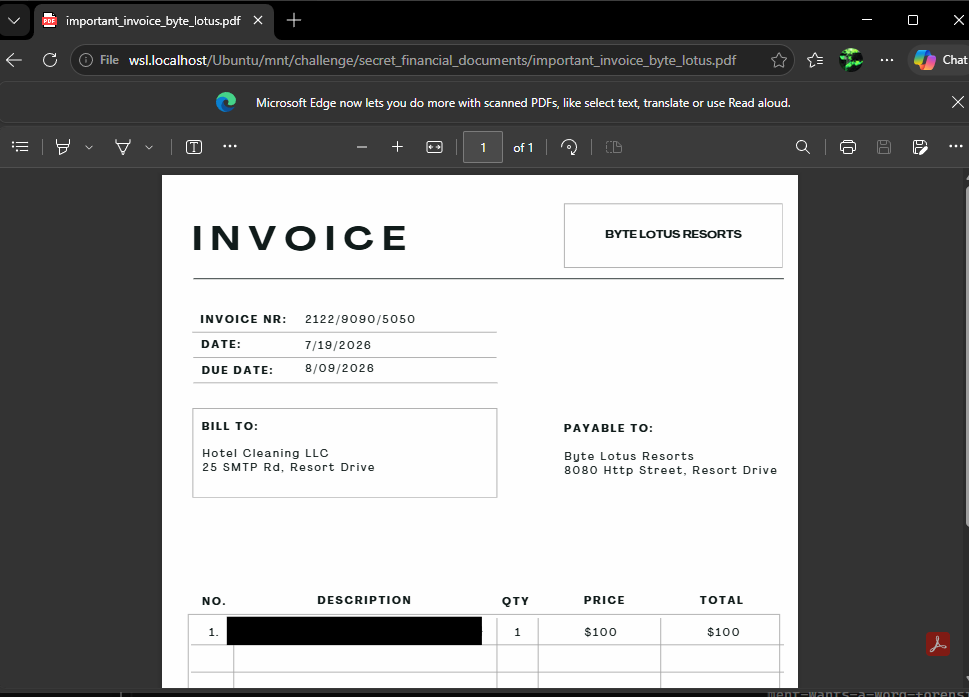
Flag inside the secret_financial_documents folder: