An inference server is specialized software that loads trained machine learning models onto hardware and manages incoming requests to generate real-time predictions. It’s the layer that lets a client talk to a model running on a GPU, usually over HTTP, sending a prompt and parameters like which model to use, sampling settings, and token limits, and getting generated output back.
In this post I look at how to identify a vLLM inference server from its unauthenticated responses. By sending requests that don’t require an API key, you can determine the web framework it runs on, its version, the model it’s serving, and the routes it exposes. This is useful because an inference server reachable without an API key can be abused to run prompts at the owner’s expense, and identifying the server is the first step in assessing that exposure. And setting --api-key is not that protection. The key gates the /v1/* routes and little else; on my vLLM 0.29.0 host, inference and utility endpoints like /invocations, /tokenize, and /detokenize still ran real work with no key.
Installation
For this post I’m using vLLM with a custom Docker Compose setup running WhiteRabbitNeo/WhiteRabbitNeo-V3-7B.
drew@llm:~/llm$ ls -las
total 24
4 drwxrwxr-x 4 drew drew 4096 Sep 20 22:55 .
4 drwxr-x--- 6 drew drew 4096 Sep 20 20:41 ..
4 -rw-rw-r-- 1 drew drew 123 Sep 20 22:42 .env
4 -rw-rw-r-- 1 drew drew 870 Sep 20 22:55 docker-compose.yml
4 drwxr-xr-x 4 root root 4096 Sep 20 19:28 hf-cache
4 drwxr-xr-x 5 root root 4096 Oct 5 04:31 webui-data
drew@llm:~/llm$ cat .env
VLLM_API_KEY=<redacted>
MODEL=WhiteRabbitNeo/WhiteRabbitNeo-V3-7B
TOOL_PARSER=hermes
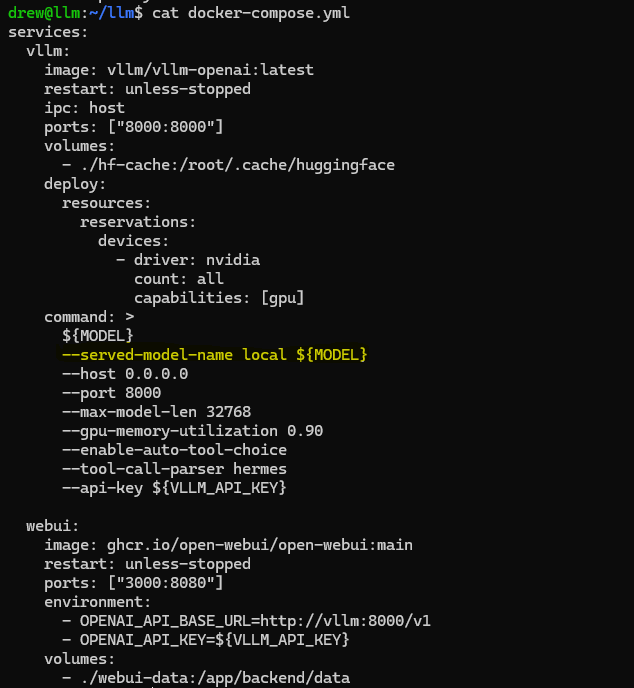
My docker-compose.yml:
services:
  vllm:
    image: vllm/vllm-openai:latest
    restart: unless-stopped
    ipc: host
    ports: ["8000:8000"]
    volumes:
      - ./hf-cache:/root/.cache/huggingface
    deploy:
      resources:
        reservations:
          devices:
            - driver: nvidia
              count: all
              capabilities: [gpu]
    command: >
      ${MODEL}
      --served-model-name local ${MODEL}
      --host 0.0.0.0
      --port 8000
      --max-model-len 32768
      --gpu-memory-utilization 0.90
      --enable-auto-tool-choice
      --tool-call-parser hermes
      --api-key ${VLLM_API_KEY}

  webui:
    image: ghcr.io/open-webui/open-webui:main
    restart: unless-stopped
    ports: ["3000:8080"]
    environment:
      - OPENAI_API_BASE_URL=http://vllm:8000/v1
      - OPENAI_API_KEY=${VLLM_API_KEY}
    volumes:
      - ./webui-data:/app/backend/data
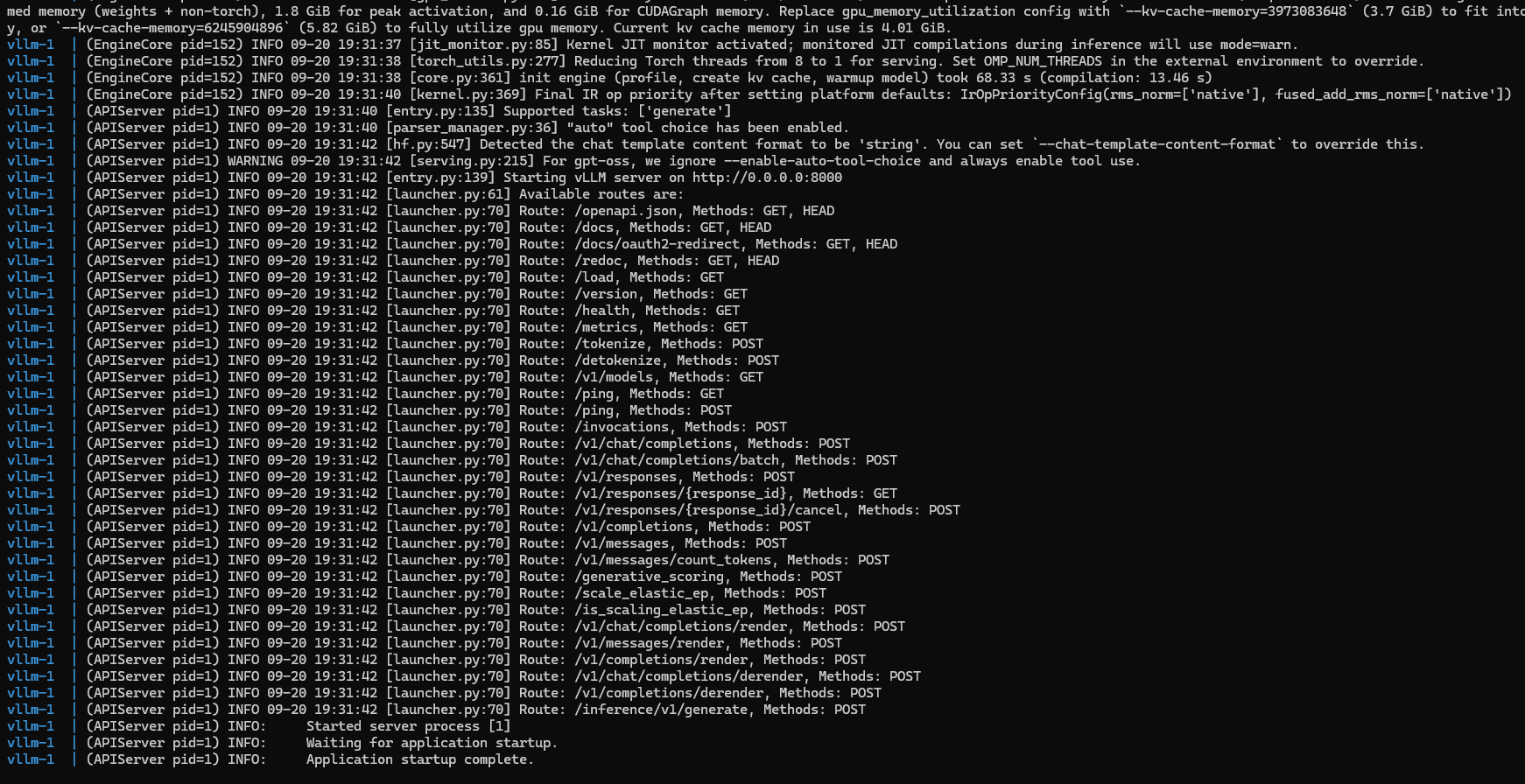
When vLLM started up, the install logs printed every route the server registered. That list is what I used next to find the live API surface.
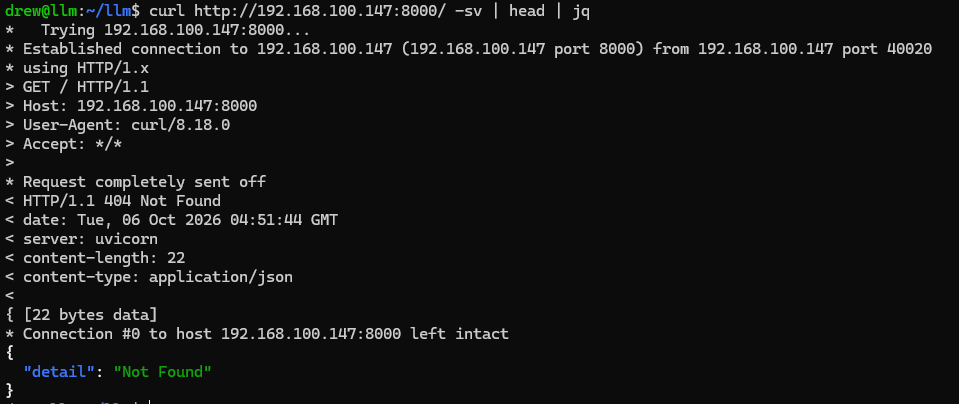
Inspecting the HTTP Headers
By sending a basic curl request to the host with -v to show the response headers, we can see the backend is served by uvicorn.
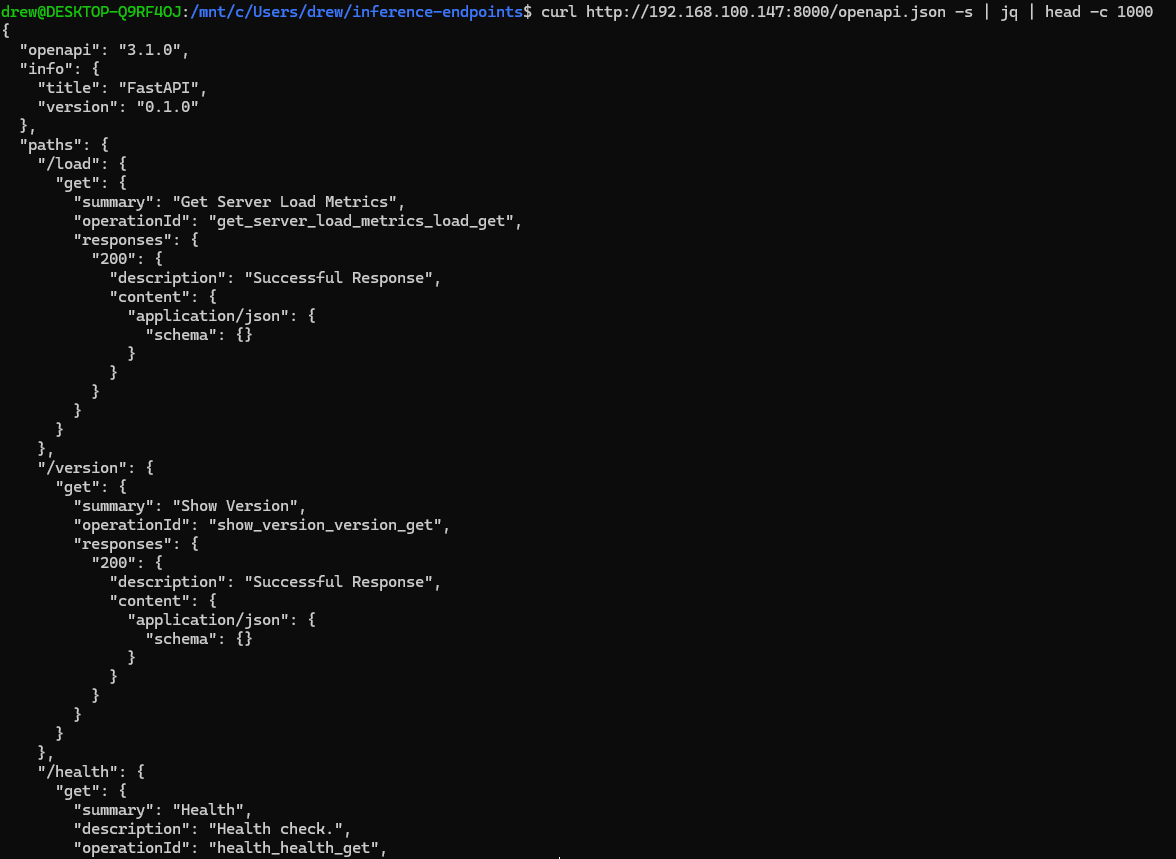
Quickly Inspecting the OpenAPI.json File
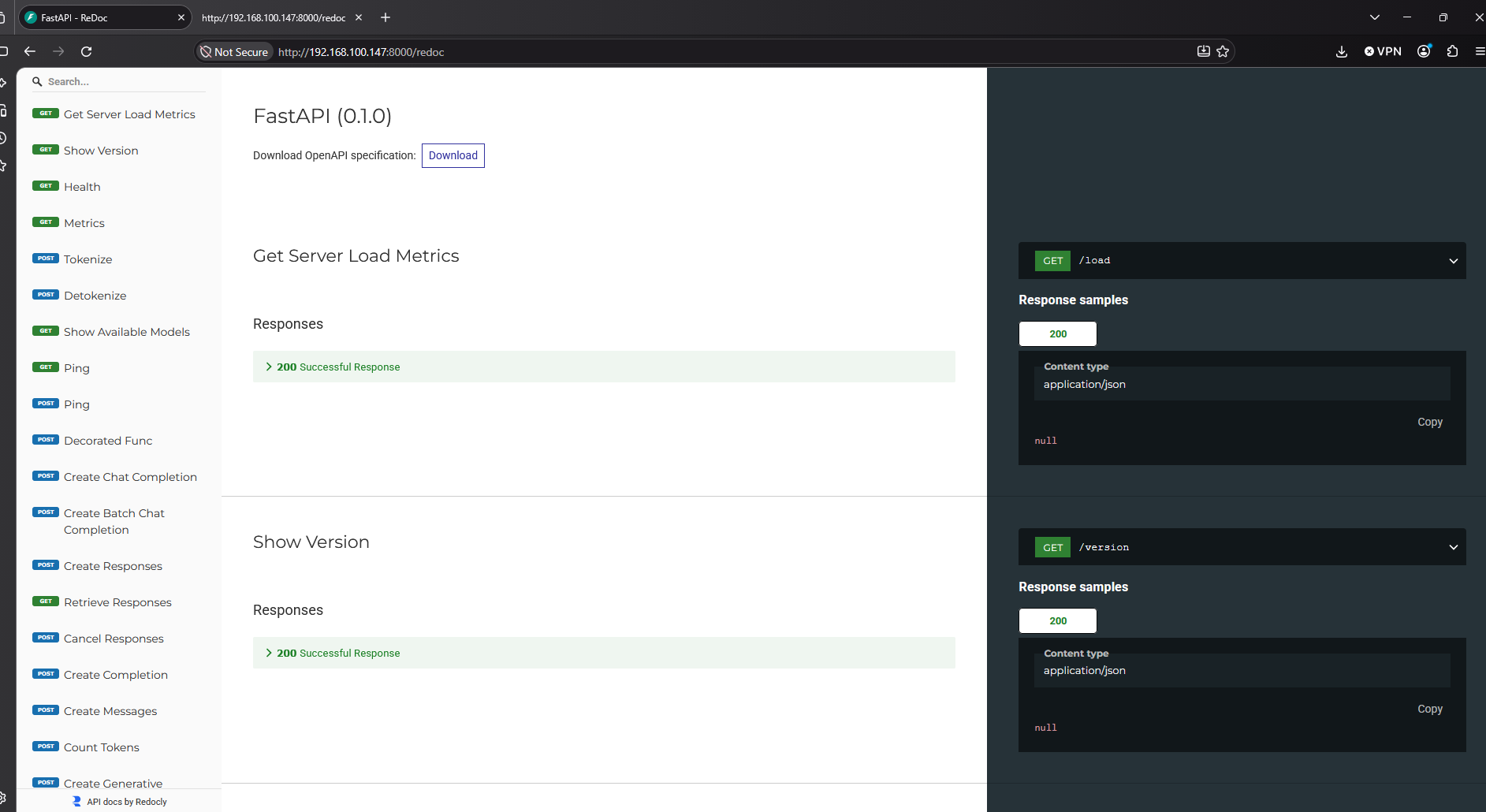
Those startup paths led me to openapi.json, which documents the API (including agentic tool schemas). The interactive docs routes from the logs (/docs, /redoc, and /docs/oauth2-redirect) aren’t listed inside that file; they show up as separate pages on the server because FastAPI docs are enabled.
Additionally the screenshot notes the FastAPI version as “0.1.0”. This is incorrect and we can confirm this by calling the /version endpoint.
Using bash I created this table to showcase each of the API endpoints available from OpenAPI. This is the full menu; the next section is about which of these still work without the API key.
| URI | Summary | Response codes |
|---|---|---|
| /load | Get Server Load Metrics | 200 |
| /version | Show Version | 200 |
| /health | Health | 200 |
| /metrics | Metrics | 200 |
| /tokenize | Tokenize | 200, 400, 404, 422, 500, 501 |
| /detokenize | Detokenize | 200, 400, 404, 422, 500 |
| /v1/models | Show Available Models | 200 |
| /ping | Ping | 200 |
| /invocations | Decorated Func | 200, 400, 415, 500 |
| /v1/chat/completions | Create Chat Completion | 200, 400, 404, 422, 500, 501 |
| /v1/chat/completions/batch | Create Batch Chat Completion | 200, 400, 404, 422, 500, 501 |
| /v1/responses | Create Responses | 200, 400, 404, 422, 500 |
| /v1/responses/{response_id} | Retrieve Responses | 200, 422 |
| /v1/responses/{response_id}/cancel | Cancel Responses | 200, 422 |
| /v1/completions | Create Completion | 200, 400, 404, 422, 500 |
| /v1/messages | Create Messages | 200, 400, 404, 422, 500 |
| /v1/messages/count_tokens | Count Tokens | 200, 400, 404, 422, 500 |
| /generative_scoring | Create Generative Scoring | 200, 400, 500 |
| /scale_elastic_ep | Scale Elastic Ep | 200, 400, 408, 500 |
| /is_scaling_elastic_ep | Is Scaling Elastic Ep | 200 |
| /v1/chat/completions/render | Render Chat Completion | 200, 400, 404, 422, 500, 501 |
| /v1/messages/render | Render Messages | 200, 400, 404, 422, 500, 501 |
| /v1/completions/render | Render Completion | 200, 400, 404, 422, 500 |
| /v1/chat/completions/derender | Derender Chat Completion | 200, 400, 404, 422, 500 |
| /v1/completions/derender | Derender Completion | 200, 400, 404, 422, 500 |
| /inference/v1/generate | Generate | 200, 400, 404, 422, 500 |
Reviewing the Documentation
My compose sets --api-key, so I expected /v1 to be locked. The vLLM documentation reveals the following list of API endpoints that do not require authentication. I used this as the checklist for the lab work below.
Inference endpoints:
/invocations- SageMaker-compatible endpoint (routes to the same inference functions as/v1endpoints)/generative_scoring- Generative scoring API/pooling- Pooling API/classify- Classification API/score- Scoring API (non-/v1variant)/rerank- Reranking API (non-/v1variant)
Operational control endpoints (only present on some deployments):
/pause- Pause generation (I tried probing the pause endpoints, but they 404 on my installation)/resume- Resume generation/is_paused- Check if generation is paused/abort_requests- Abort in-flight requests (causes loss of in-flight work)/scale_elastic_ep- Trigger scaling operations/is_scaling_elastic_ep- Check if scaling is in progress/init_weight_transfer_engine- Initialize weight transfer engine for RLHF/update_weights- Update model weights (can alter model behavior)/get_world_size- Get distributed world size/abort_requests- Abort in-flight requests (only when--tokens-onlyis also set)
Utility endpoints:
/tokenize- Tokenize text/detokenize- Detokenize tokens/health- Health check/ping- SageMaker health check/version- Version information/load- Server load metrics
The docs list is not the whole story on my host. /docs, /redoc, /docs/oauth2-redirect, and /openapi.json are extra unauthenticated surfaces from FastAPI’s interactive docs. /metrics is another ops endpoint that answered without a key even though it is not in that excerpt.
What the Unauthenticated GET Routes Expose
Docs also flag POST inference and control routes; I started with the quiet GET-style surfaces first. From the lab, the following returned status code 200 without any type of authentication:
- load
- docs/oauth2-redirect
- health
- ping
- docs
- redoc
- openapi.json
- version
- metrics
Load
Returns how busy the server is right now (0 = idle):
$ curl http://192.168.100.147:8000/load -s | jq
{
 "server_load": 0
}
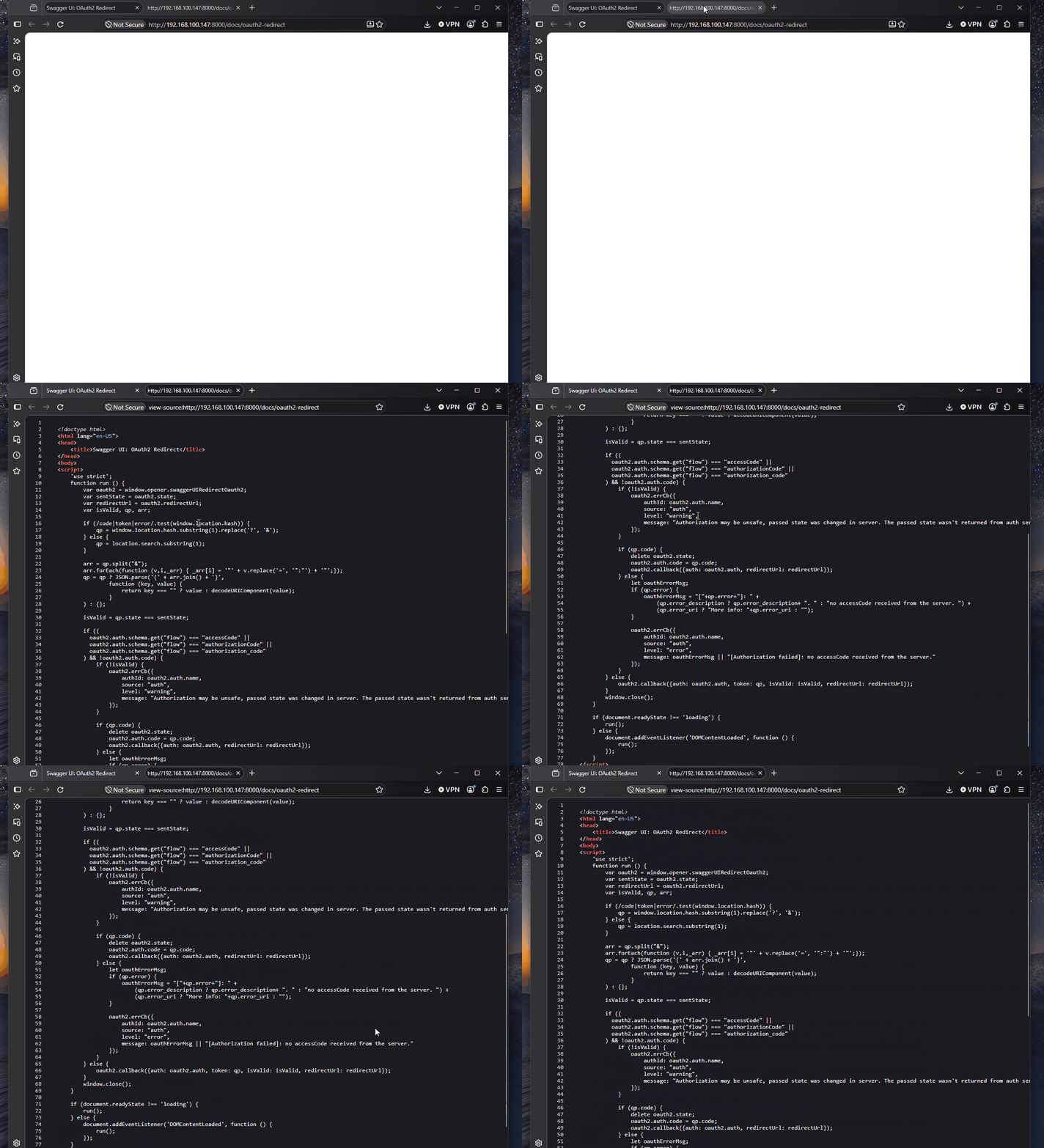
docs/oauth2-redirect
Swagger’s OAuth callback page. This is docs UI plumbing from FastAPI/Swagger, not OAuth on the inference API itself.
health / ping
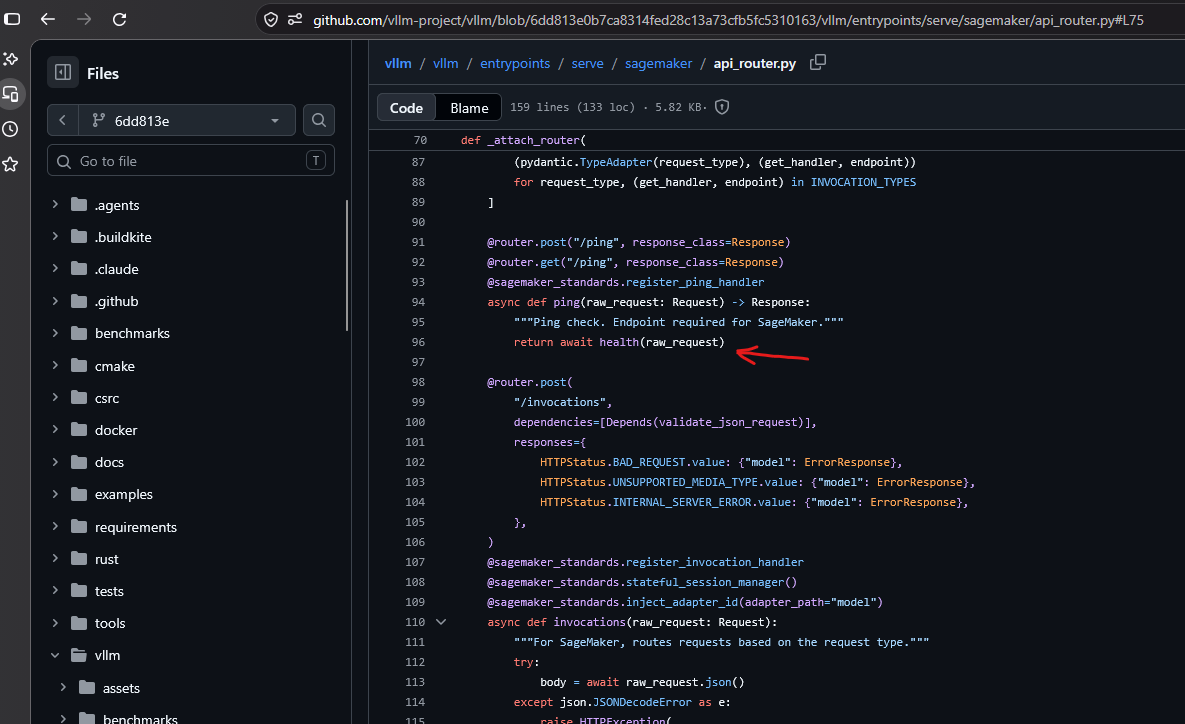
Both return 200 OK with an empty body. In vLLM’s code /ping is wired to the same handler as /health, so they behave the same.
$ curl http://192.168.100.147:8000/health -v
* Trying 192.168.100.147:8000...
* Established connection to 192.168.100.147 (192.168.100.147 port 8000) from 172.25.146.15 port 57022
* using HTTP/1.x
> GET /health HTTP/1.1
> Host: 192.168.100.147:8000
> User-Agent: curl/8.18.0
> Accept: */*
>
* Request completely sent off
< HTTP/1.1 200 OK
< date: Mon, 05 Oct 2026 23:31:44 GMT
< server: uvicorn
< content-length: 0
<
* Connection #0 to host 192.168.100.147 left intact
Redoc
Documentation guide for vLLM. Like /docs and /openapi.json, this is exposed because interactive API docs are on.
openapi.json
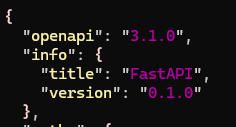
As mentioned, this file documents the entire API structure (as the name OpenAPI suggests :) ). It identifies the web framework as FastAPI and carries an application version string (0.1.0):
Every request and response body is defined under components.schemas. We can list just their names using the following command:
$ jq -r '.components.schemas | keys[]' openapi.jsonAmong them are schemas for agentic tools. Let’s look at ApplyPatchTool:
$ jq '.components.schemas.ApplyPatchTool' openapi.json{
"properties": {
"type": {
"type": "string",
"const": "apply_patch",
"title": "Type"
},
"allowed_callers": {
"anyOf": [
{
"items": {
"type": "string",
"enum": [
"direct",
"programmatic"
]
},
"type": "array"
},
{
"type": "null"
}
],
"title": "Allowed Callers"
}
},
"additionalProperties": true,
"type": "object",
"required": [
"type"
],
"title": "ApplyPatchTool",
"description": "Allows the assistant to create, delete, or update files using unified diffs."
}This tool lets the model create, delete, or update files using unified diffs. The type field is fixed (const) to apply_patch. That’s how the server identifies which tool is being called. These schemas ship as part of the OpenAI Responses API surface that vLLM implements, so they appear in the spec whether or not this deployment actually wires them up.
Metrics
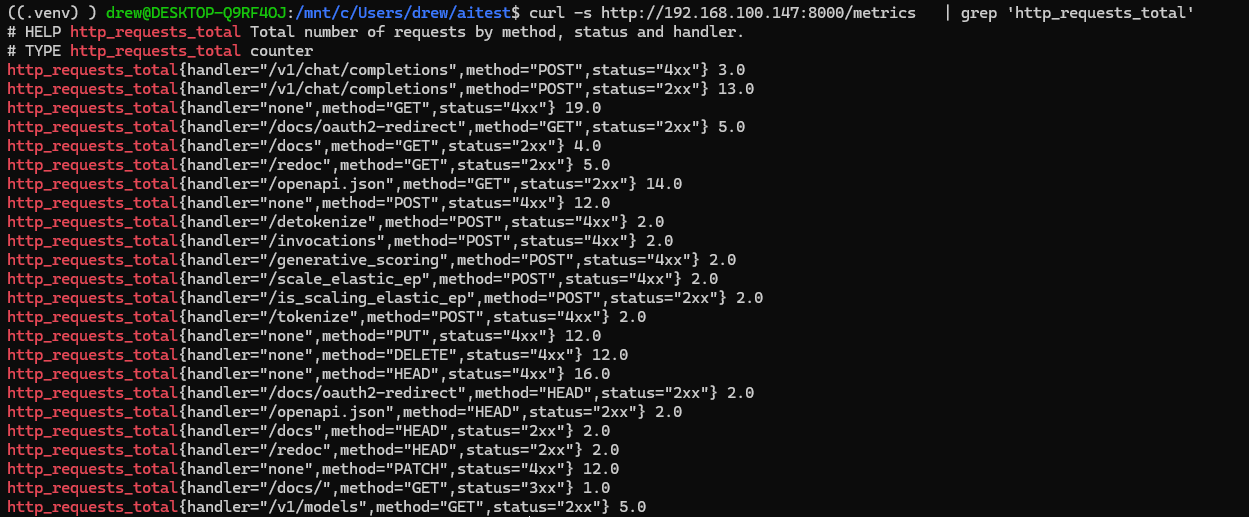
This is a Prometheus scrape endpoint for vLLM mechanics - counters and gauges about HTTP and engine load, not an access log. It was reachable without auth on my box even though it is not called out in the security list excerpt above.
You will not find chat messages, tool-call payloads, client IPs, or request tokens here.
Here we can see the amount of requests processed by vLLM with the number at the end being the amount of requests.
Here we can see the live request queue along with the engine and model name. (note: /health won’t bump http_requests_total)
$ curl -s http://192.168.100.147:8000/metrics \
 | grep -E 'vllm:(num_requests_running|num_requests_waiting|kv_cache_usage_perc)\{'
vllm:num_requests_running{engine="0",model_name="local"} 0.0
vllm:num_requests_waiting{engine="0",model_name="local"} 0.0
vllm:kv_cache_usage_perc{engine="0",model_name="local"} 0.0
The model name is specified in my docker-compose.yml on the LLM host and can be modified with the --served-model-name argument.
Unauthenticated POST Requests
Next I checked the POST routes the docs warn about, and compared them to what my server actually accepted without a Bearer token.
Tokenization and Detokenization
/tokenize takes text and returns the token IDs the model would split it into:
curl -s http://192.168.100.147:8000/tokenize -H 'Content-Type: application/json' \
 -d '{"model":"local","prompt":"hello world","return_token_strs":true}'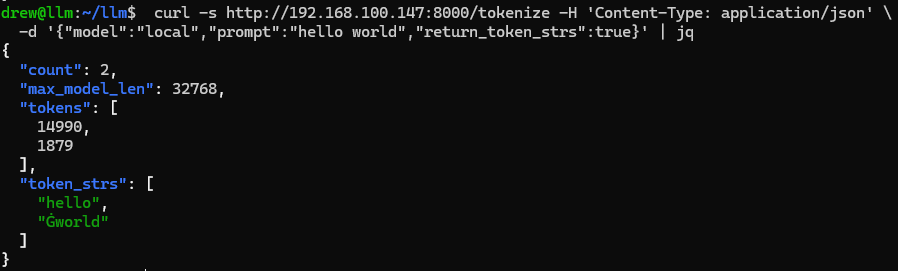
/detokenize does the reverse - hand it token IDs, get the text back:
$ curl -s http://192.168.100.147:8000/detokenize -H 'Content-Type: application/json' -d '{"model":"local","tokens":[14990,1879]}' | jq
{
 "prompt": "hello world"
}
Invocations
The docs say /invocations routes to the same inference functions as /v1. On my server that matched: the /invocations endpoint accepts prompting requests without authentication - full generation, no API key:
$ curl -s http://192.168.100.147:8000/invocations -H 'Content-Type: application/json' \
 -d '{"model":"local","prompt":"whats up?"}'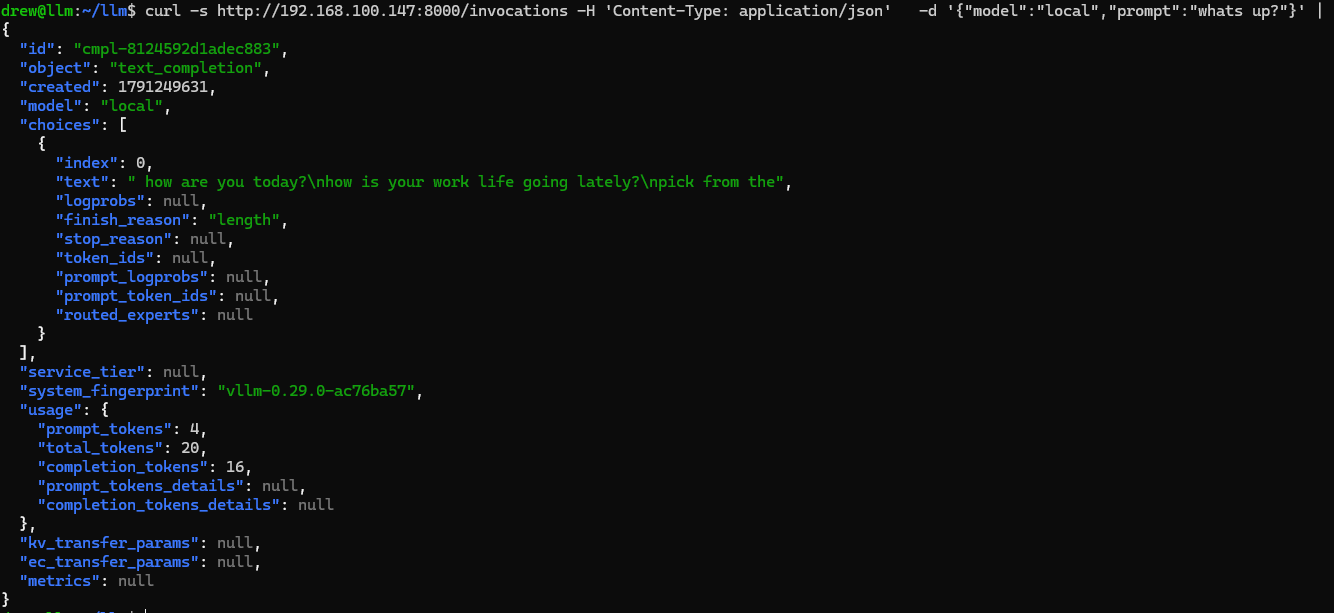
Additionally this also discloses a “system_fingerprint” key which reveals vllm-0.29.0-ac76ba57. ac76ba57 is a build-specific identifier. It doesn’t resolve to a public commit in the vLLM repo.
This is also reported on the vLLM documentation:
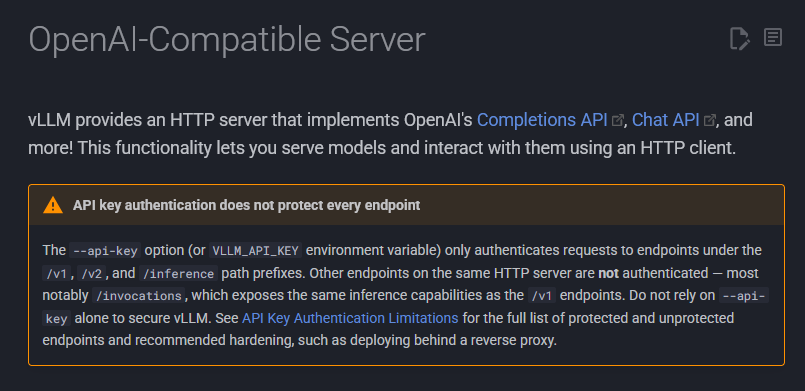
Takeaway
None of this is new, the security docs name /invocations and the other unauthenticated routes outright. What this walkthrough is really about is enumeration: the repeatable path from an open port to a fully identified target, using only responses the server hands out without a key.
With the information above we can answer the following questions:
- Is it vLLM?
server: uvicornheader +title: "FastAPI"/version: "0.1.0"inopenapi.json(the FastAPI default, not a real version) + vLLM-specific routes like/invocationsand/generative_scoring. - What version?
/versionand thesystem_fingerprintin any completion response - What model?
/v1/models, or themodel_namelabel in/metrics. - What can it do?
openapi.jsonis the full route map and tool schemas;/metricsshows live load and request counts. - Can I actually use it for free?
/invocations,/tokenize,/detokenizeaccept real work with no Bearer token.